Turn Your WHMCS Client Area Into a Branded Help Center
Your customers purchase hosting from your company and expect useful answers in the same place where they manage their services. When someone needs to create an email account, upload a website, change a domain setting or install WordPress, a clearly written tutorial can make the difference between an easy task and a frustrating support request.
Building that collection from scratch is demanding. Useful documentation needs accurate procedures, relevant screenshots, descriptive titles and an organized structure. The work continues after publication because software interfaces and hosting environments change. For a provider with a small support team, creating a complete library can be difficult to fit around daily operations.
The RSH Web Services WHMCS knowledge base addon provides a starting point: 150 prepared tutorials imported into your existing WHMCS knowledge base. Rather than publishing an empty help center or sending customers to unrelated websites, you can present the documentation as part of your own hosting business.
The articles can be edited after import. You control the terminology, company references and practical instructions your customers read. It is an efficient way to establish substantial documentation without giving up the ability to tailor that information to the hosting services you actually provide.
Works With Your Existing WHMCS Theme
No new theme required. No separate support portal. The RSH Web Services addon imports its articles into the knowledge base already built into WHMCS. Your customers see the tutorials through your existing WHMCS Client Area, using its active system theme, navigation and styling.
The addon does not include or install a theme. Instead, the imported knowledge base articles use the colors, layout and styling of the WHMCS theme you already have in place. You do not need to change your existing design to add the tutorial library.
You also have complete control over the knowledge base content. Every article can be edited and customized to suit your hosting business, including changing instructions, rewriting content, replacing images and screenshots, adding your own links, or including company-specific information. You can organize and expand the documentation however you prefer, giving your customers a support resource that reflects your services and branding.
For hosting companies that have invested in a branded client area, this is an important benefit: you keep the design customers already recognize while gaining a much larger collection of useful support articles.
For more information on Themes and Templates documentation. And the Knowledgebase documentation.
What Is a White Label WHMCS Knowledge Base?
A white label knowledge base is customer documentation that a business can publish as part of its own support experience. The material appears inside the provider's existing customer environment rather than sending readers to a separate documentation brand. For hosting businesses using WHMCS, that means the same client area can contain billing information, support access and helpful technical articles.
WHMCS already includes the ability to create knowledge base categories and articles. The RSH Web Services package supplies prepared content and an addon for importing it into that system. It is not a replacement help desk, a separate website builder or a competing client portal. The existing WHMCS theme and styling remain in use.
Once imported, providers can edit the articles through WHMCS. They can add company details, link to relevant services, clarify account specific procedures or remove references to features that are not available on their plans. This flexibility is central to making third party documentation useful under a hosting company's own brand.
The product is particularly relevant to cPanel hosting businesses. Its tutorials explain common control panel tasks alongside WordPress, FTP and Softaculous activities that many hosting customers need to complete regularly.
Why Your Own Branded Hosting Documentation Matters
A new hosting customer may know exactly what website they want but have little experience with DNS records, FTP clients or mailbox configuration. They should not have to guess which outside tutorial applies to their server. Instructions presented through the provider's own support center give customers a more direct route to answers.
Branding also communicates consistency. Familiar navigation, support terminology and links help customers recognize that the documentation belongs to the service they purchased. The goal is not decoration alone. A branded support center should make it easier to locate reliable information and know when to contact the support team.
- Consistent customer experience: Keep guidance within the WHMCS environment users already recognize.
- Customer independence: Help users complete routine account tasks without opening a ticket for every question.
- Professional presentation: Publish a useful collection instead of leaving a largely empty knowledge base.
- Shared support references: Give staff and customers the same starting instructions.
- Control over instructions: Adjust procedures and wording to reflect actual account features.
- Room to grow: Add your own policies, walkthroughs and troubleshooting articles over time.
A knowledge base should complement personal support, not replace it. Customers will still need assistance with account specific errors, service problems and unusual technical situations. Good documentation lets staff concentrate on those issues rather than repeatedly typing the same basic directions.
150 Ready Made Tutorials Across Four Hosting Categories
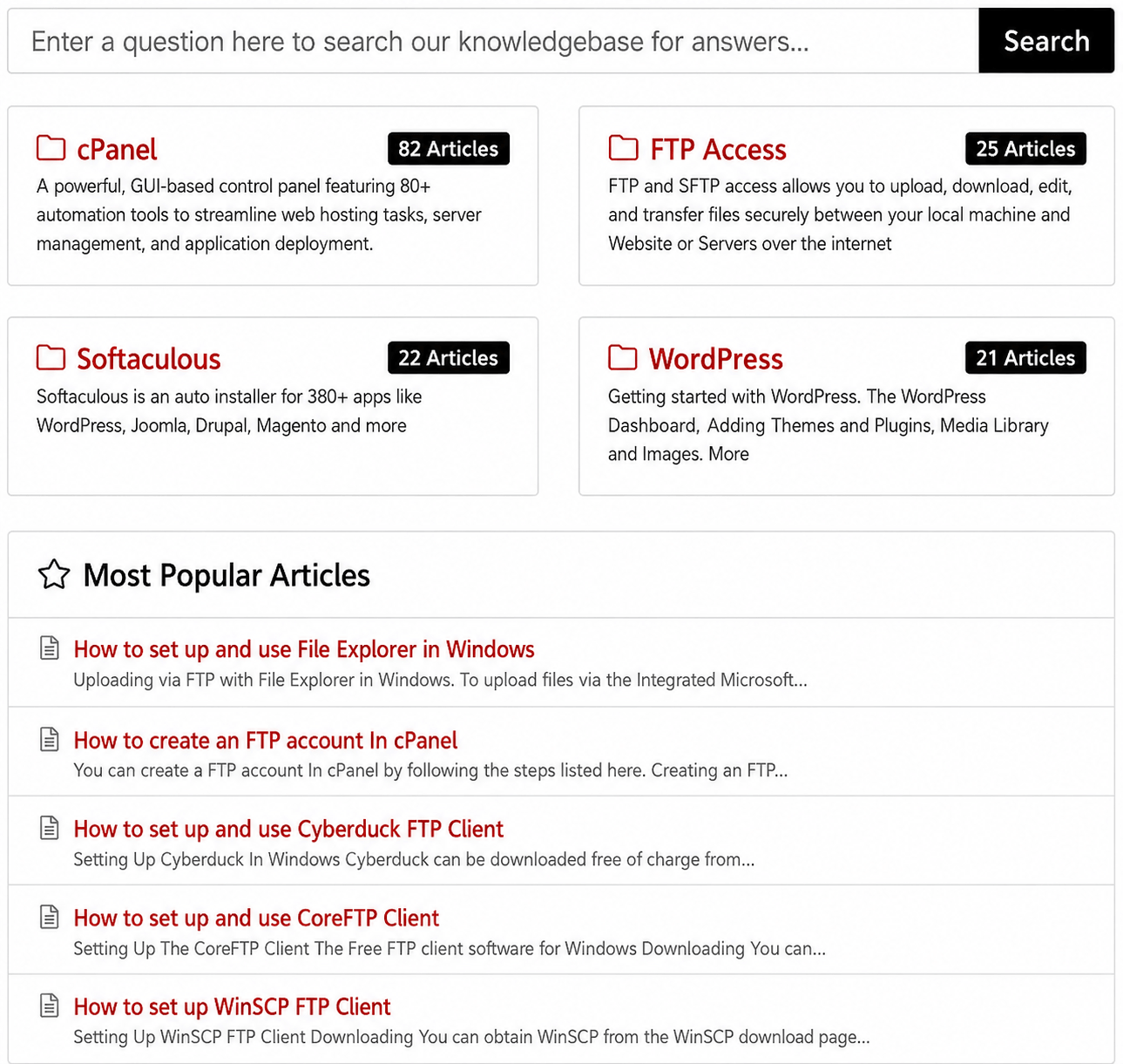
The package includes 150 prepared articles covering common activities encountered after a hosting account is activated. The topics are grouped into four recognizable categories, with screenshots included to make technical procedures easier to follow.
82 cPanel Articles
Email accounts, domains, subdomains, File Manager, databases, backups, cron jobs and account settings.
21 WordPress Articles
Installation, dashboard tasks, publishing content, media, themes, plugins and everyday management.
22 Softaculous Articles
Application installation, updates, backups, restoration, cloning and related management features.
25 FTP Articles
FTP accounts, connecting clients, file transfers, permissions and connection troubleshooting.
These subjects cover different stages of the customer journey. Someone building a first website needs different help from a customer connecting an FTP client or changing email settings. Organized categories allow those users to find relevant material without scrolling through an unstructured list.
You can see how the library is presented in the live WHMCS knowledge base demonstration. It provides a practical look at category navigation and the customer facing article experience before purchase.
Edit the Content So It Matches Your Hosting Services
Prepared content saves writing time, but customer instructions must still be accurate for your hosting environment. A reseller might offer only a subset of cPanel features. A managed hosting provider may handle some tasks on the customer's behalf. Different companies use different nameservers, email settings and support procedures.
For that reason, the ability to edit imported articles is essential. Providers can open the content within WHMCS, review the steps and update any details that do not match their services. Your knowledge base should never direct a customer to use a feature they cannot access.
- Add your branding: Include your business name and appropriate company language.
- Review available tools: Check tutorials against the features enabled on your hosting plans.
- Update support links: Direct customers to your own help desk and relevant resources.
- Adjust account details: Replace generic information with approved provider specific settings.
- Improve explanations: Simplify wording for beginners or add detail for experienced customers.
- Check screenshots: Replace images when your current customer interface differs.
You can also write additional articles for your own packages and policies. The imported library becomes a foundation for your support content rather than a limit on what you may publish. For details about editing and module behavior, see the WHMCS knowledge base addon FAQ.
A Practical Fit for Hosting Resellers and Web Agencies
Smaller providers often face documentation demands similar to those of larger hosting companies. A reseller may need to answer questions about email setup, domains, WordPress and FTP while also handling billing and account management. There may be no dedicated writer or documentation specialist available.
Ready made articles are useful in that situation because they reduce the amount of original content required before the support center becomes helpful. The provider can focus on reviewing the imported instructions and filling gaps that are specific to its services.
Web design agencies that include hosting in their projects encounter a related need. Their clients may know how to change website content but have little experience working with control panels or transferring files. A branded documentation library can provide guidance after the website is delivered, without requiring the agency to create every tutorial from scratch.
Managed hosting providers may use selected articles while modifying instructions to reflect tasks handled by their team. Businesses using a different hosting control panel should examine the category coverage before purchasing, because the package is centered on cPanel and associated applications rather than every possible hosting platform.
Make Customer Onboarding Easier From Day One
Account activation is when documentation often has the greatest immediate value. Customers may need to connect a domain, create mailboxes, upload site files, install WordPress or understand the hosting dashboard. These are predictable activities, making them ideal for clear tutorials that can be reused across many accounts.
Instead of placing every technical instruction into a lengthy welcome email, a company can point customers to focused knowledge base articles. The email remains easy to read and customers can access detailed steps when they reach the relevant task. Existing customers gain the same benefit when they need to repeat something months later.
Organize onboarding guidance around what a customer is trying to accomplish rather than around internal support departments. For example, a new customer setting up a website should be able to reach installation instructions and file management topics quickly. Someone configuring business email should find a direct path to mailbox and DNS guidance.
A consistent onboarding experience is especially valuable as the business grows. New customers can receive the same baseline information, while support staff can improve the shared instructions whenever they notice recurring confusion. That creates a clearer process than relying on individual employees to explain routine tasks differently each time.
How the WHMCS Knowledge Base Addon Works
The included module imports the prepared tutorials and categories into an existing WHMCS knowledge base. Providers do not need to create all 150 article entries manually. As with any WHMCS module installation, it is sensible to back up your files and database before making changes.
- Purchase and download: Obtain the package and extract the supplied files.
- Protect your installation: Create a current WHMCS backup before installing a module.
- Upload module files: Place the included addon folder in the WHMCS /modules/addons directory.
- Activate the addon: Enable the module using the WHMCS administration settings.
- Review the result: Check the imported categories, articles, screenshots and navigation.
- Customize and publish: Adjust content to match your business before promoting the new help center.
The module uses the existing WHMCS knowledge base presentation, so the imported material follows the site's established theme. Your own articles may be maintained alongside the imported collection.
There is one maintenance detail worth understanding before installation. The product's documentation states that deactivating the addon removes the categories and articles it imported. Reactivation imports fresh copies rather than restoring edits that were made previously. Keep reliable backups of your customized content and follow the supplier's instructions before deactivating or reinstalling the module.
Use Documentation to Reduce Repetitive Support Work
Many hosting tickets involve questions with repeatable answers. A customer wants to create a subdomain, another needs an FTP connection guide, and a third cannot find a WordPress setting. When a general procedure answers the question, a support representative can share a maintained article instead of composing the entire explanation again.
This does not mean every ticket can be solved by a tutorial. Server errors, account permissions, service outages and unusual configurations often require direct investigation. The benefit of a knowledge base lies in giving common instructional questions a dependable home.
A shared article also improves consistency. If staff notice that one step is unclear, they can revise the documentation so the next customer receives a better explanation. Over time, the collection can reflect the questions customers really ask rather than a theoretical list of topics.
Our related guide on how to reduce support tickets with a WHMCS knowledge base explores the relationship between useful articles and the day to day work of hosting support teams.
Ready Made Articles Versus Building a Library Yourself
Writing every article internally gives a company complete control from the first sentence. It also requires time for topic research, technical checks, screenshots, formatting, category design and maintenance. A comprehensive collection may be difficult to justify when a support team is already handling customer requests.
The ready made approach changes the starting point. Instead of an empty library, the provider gets 150 prepared articles and can spend its effort reviewing and tailoring them. That is different from claiming the work is finished forever. Documentation still needs regular updates as software interfaces and account options change.
- Initial writing: Start with prepared explanations instead of drafting each tutorial.
- Subject coverage: Obtain cPanel, WordPress, FTP and Softaculous topics together.
- Supporting images: Work with articles that already include instructional screenshots.
- Organization: Import prepared categories and refine them for your customers.
- Custom edits: Modify articles inside WHMCS to suit your own environment.
- Maintenance: Continue checking instructions and updating material as needed.
For more about choosing appropriate material for a support library, read our article on knowledge base articles for hosting companies. It explains why topic coverage and practical usefulness matter more than merely counting pages.
Support SEO, Answer Engines and AI Search With Useful Articles
Hosting customers often search for specific solutions rather than broad descriptions of web hosting. They may ask how to create an email address in cPanel, how to transfer files with FTP or how to install WordPress using Softaculous. A public knowledge base can address these questions when its articles are accurate, clearly titled and accessible to search engines.
Search visibility is not automatic. Publishing many similar tutorials does not guarantee indexing or rankings, and an addon cannot promise that a search engine or AI assistant will recommend a particular page. Duplicate or outdated information may be less useful than a smaller collection reviewed for accuracy.
The same editorial choices that help readers can make documentation easier for answer engines and generative systems to interpret. A clearly defined task, identifiable platform, precise steps and meaningful headings provide context. Relevant internal links help readers move to supporting instructions. Screenshots should add useful information rather than substitute for text that explains the process.
- Write descriptive titles: State the task and platform clearly.
- Focus each tutorial: Answer the question the reader came to solve.
- Specify the interface: Identify whether instructions concern cPanel, WHMCS or another tool.
- Check technical accuracy: Review menus, settings, screenshots and prerequisites.
- Link related content: Connect tutorials when the next step genuinely helps.
- Maintain the material: Correct stale guidance and improve confusing explanations.
These practices support traditional SEO, answer engine optimization and generative engine optimization through clarity rather than keyword stuffing. They also make the pages easier for customers to use, which remains the primary purpose of hosting documentation.
What Does the White Label WHMCS Knowledge Base Cost?
The RSH Web Services package is currently advertised for $32 as a one time purchase, with lifetime updates included and no recurring subscription charge for the knowledge base package. It includes the prepared content, supporting screenshots and import addon.
The value of a prepared library should be considered alongside the time it would take to produce similar documentation internally. Creating accurate instructions and keeping them organized is real work, even when nobody purchases a documentation subscription. A ready made collection reduces that initial workload while leaving the provider responsible for checking and maintaining published information.
You can review the ready made WHMCS cPanel tutorials guide for additional detail about content coverage, or read how to simplify hosting support with pre made knowledge base articles.
Frequently Asked Questions
Can I publish the articles with my own hosting company branding?
Yes. The imported material can be edited in WHMCS, so you can update text, references, links and screenshots to suit your business. The knowledge base uses your existing WHMCS theme.
Do customers need a separate account for these tutorials?
No additional documentation platform is needed. The material is imported into your existing WHMCS knowledge base. Actual access depends on your WHMCS configuration.
Are all the articles imported automatically?
The supplied addon imports the prepared content and categories into WHMCS after installation and activation according to the included instructions.
Can I add my own tutorials?
Yes. WHMCS supports creating additional knowledge base articles alongside imported content, including guides about your own services and account procedures.
Will the addon replace my client area design?
No. The addon imports articles into your existing WHMCS knowledge base. It does not install or replace a theme. Your knowledge base uses the colors, layout and styling of the WHMCS theme you already use.
Can a knowledge base eliminate support tickets?
No. A good library can address many routine questions, but account specific and complex technical problems still require staff assistance. Results depend on your customers and how accurately the documentation matches your services.
Is there a monthly subscription?
No. The advertised purchase price is $32 once, with lifetime updates included.
Where can I find more installation and product details?
Visit the complete product FAQ for additional answers about installation, editing and maintenance.
Give Customers the Answers They Need Under Your Own Brand
Clear support documentation makes a hosting service easier to use. Customers can find familiar tasks without waiting for an individual explanation, while staff have a consistent resource to share when routine questions arise. The benefits depend on accuracy, organization and regular maintenance, not simply the number of published pages.
The RSH Web Services white label WHMCS knowledge base addon gives hosting providers a practical foundation with 150 prepared cPanel, WordPress, Softaculous and FTP articles. Because the content is editable, it can become part of your own customer experience rather than an isolated collection of generic tutorials.
Build a stronger branded support center without writing every article from scratch. Review the WHMCS knowledge base package, explore the live demonstration and decide how the tutorials can support the customers you serve.