Customer Documentation for cPanel

WHMCS cPanel Knowledge Base Articles for Web Hosting Providers

Build a complete customer support center in minutes with professionally written cPanel, WordPress, Softaculous, and FTP tutorials. Import everything directly into WHMCS and give customers a self-service resource for common hosting questions.

Purchase $32 Live Demo

One-Time Purchase • Instant Download • Fully Editable • WHMCS Ready

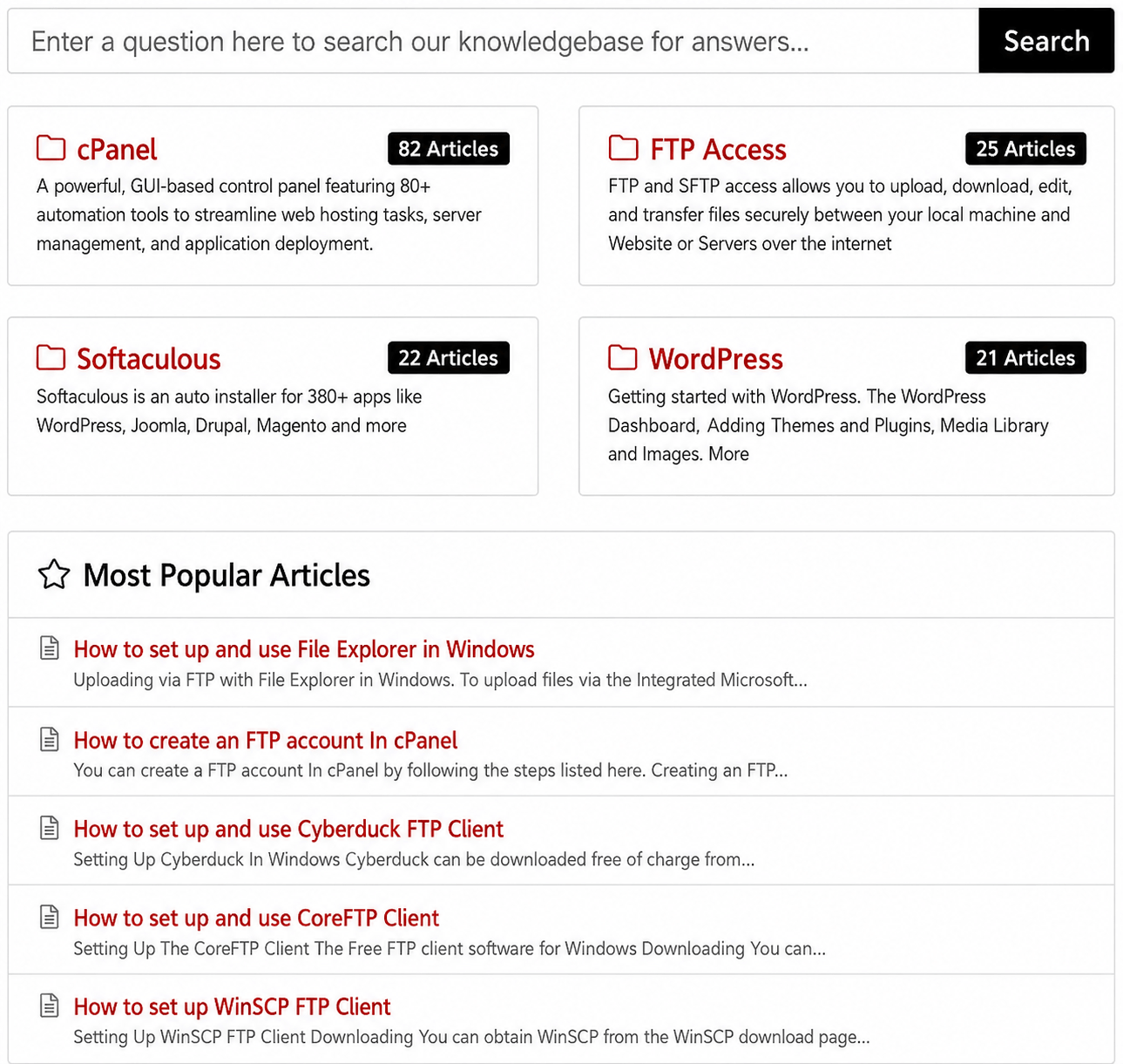
Screen Shot of the Knowledge Base Main Page showing cPanel, WordPress, Softaculous and FTP

WHMCS Knowledge Base at a Glance

A ready-made customer documentation package built for web hosting providers using WHMCS and cPanel.

150+

Ready-to-use articles

82

cPanel articles

68

WordPress, FTP & Softaculous articles

$32

One-time payment with lifetime updates

Why Hosting Providers Choose This

Everything needed to launch a professional knowledge base.
Give your customers instant access to clear, professional answers with our WHMCS Knowledge Base Articles. Designed specifically for web hosting companies, resellers, and managed hosting providers, this ready to use knowledge base includes step by step tutorials for cPanel, WordPress, Softaculous, FTP, email accounts, DNS management, SSL certificates, and many other common hosting tasks. Reduce repetitive support tickets, improve customer satisfaction, and create a complete self service support center in minutes without spending weeks writing documentation from scratch.

Ready to Import
  • Install directly into WHMCS using the included addon.
150+ Articles
  • Covering cPanel, WordPress, FTP and Softaculous.
Fully Editable
  • Customize everything inside WHMCS anytime.
One-Time Purchase
  • No subscriptions or recurring fees.

Spend Less Time Answering Repetitive Questions

Give your customers immediate access to clear, step-by-step answers while your support team concentrates on more important issues.
There is no need to spend weeks writing, formatting, illustrating, and organizing a knowledge base from scratch.

Why Use a Ready-Made WHMCS Knowledge Base?

Give hosting customers clear self-service documentation without building an entire tutorial library from scratch.

Reduce Repetitive Support Work

Customers can find step-by-step answers to common cPanel, WordPress, FTP and Softaculous questions before opening a support ticket.

Launch Documentation Faster

Start with 150+ prepared articles instead of writing, formatting and organizing each tutorial individually.

Improve Customer Self-Service

Provide an organized resource customers can search when they need help with common website and hosting tasks.

Customize for Your Hosting Business

Edit the imported articles inside WHMCS so the wording and instructions better match your services, policies and customer needs.

Covered Categories for a
Comprehensive Support System

Each article is carefully written with clear, step-by-step instructions and helpful screenshots to guide users through common tasks.

cPanel

  • 82 Articles
    Managing email accounts. Setting up domains and subdomains. Creating backups and restoring data. Cron job automation. Using the File Manager and databases, & more
    View Demo

WordPress

  • 21 Articles
    Installing and configuring WordPress. Adding themes and essential plugins. Managing media libraries. Securing WordPress sites against threats, Navigating the WordPress dashboard, & more
    View Demo

FTP

  • 25 Articles
    How to set up popular FTP clients like Cyberduck and Commander One. Creating and managing FTP accounts within cPanel. Secure file transfers between computers and servers, & more
    View Demo

Softaculous

  • 22 Articles
    Installing WordPress, Joomla, Magento. Over 380 apps. Creating and restoring backups. Managing installed applications. Managing app updates, Softaculous WordPress Manager, & more
    View Demo

How It Works

Go from purchase to a customized WHMCS knowledge base in three straightforward steps.

1. Purchase & Download

Purchase the package and download the knowledge base files and included WHMCS import addon.

2. Import Into WHMCS

Use the included addon to install the prepared articles into your WHMCS knowledge base.

3. Customize & Publish

Edit the content as needed for your hosting environment, branding and support procedures.

Ready-Made Knowledge Base vs. Writing It Yourself

Compare the included package with creating a hosting knowledge base article by article.

FeatureRSH WHMCS Knowledge BaseWriting Articles Yourself
Article library150+ ready-made articlesCreate each article individually
cPanel tutorials82 includedWrite and organize yourself
WordPress, FTP & Softaculous68 articles includedCreate each topic yourself
ScreenshotsIncluded in the tutorialsCapture and add your own
WHMCS importIncluded addonBuild or enter content manually
EditingFully editable in WHMCSFully controlled by you
UpdatesLifetime updates includedYou maintain your own articles

Who Is This Knowledge Base For?

Designed for businesses that provide hosting services and want a faster way to offer customer self-service documentation.

  • Web hosting companies
  • cPanel hosting providers
  • WHMCS hosting businesses
  • Hosting resellers
  • Managed hosting providers
  • Agencies and web designers offering hosting

What Hosting Companies Are Saying

  • “Wonderful product, support is quick to answer.”
    Rob Keck
  • “Instead of creating hundreds of articles from scratch, we were able to launch a polished knowledge base in a single afternoon.”
    Isabelle Brooks
  • "The articles are clear comprehensive perfectly tailored for cPanel users"
    Ralp Doty
  • “Everything imported without problems, and the documentation is well structured.”
    Connor Hayes

Read 100+ Reviews on the WHMCS Marketplace

$32.00

One-time payment • Lifetime updates

  • 150+ Articles
  • cPanel + WordPress + Softaculous + FTP
  • Support & Branding Help Available
Buy Now

WHMCS cPanel Knowledge Base FAQ

Common questions from hosting providers considering a ready-made WHMCS knowledge base.

What are WHMCS cPanel knowledge base articles?

They are customer-facing help articles designed for a WHMCS knowledge base, with step-by-step guidance for common hosting tasks. For more background, see how a WHMCS cPanel knowledge base supports hosting customers.

How many knowledge base articles are included?

The package includes 150+ articles: 82 cPanel articles, 21 WordPress articles, 25 FTP articles and 22 Softaculous articles.

How do I import the articles into WHMCS?

An addon is included to install the articles directly into WHMCS. After importing, you can review and edit the content for your own hosting environment.

Can I edit and brand the articles for my hosting company?

Yes. The articles are fully editable inside WHMCS, allowing you to customize the content for your services, terminology and support procedures.

Are screenshots included with the tutorials?

Yes. The tutorials include screenshots to help guide customers through common tasks.

What cPanel topics are covered?

The cPanel collection covers common tasks such as email accounts, domains and subdomains, backups, cron jobs, File Manager and databases. You can also browse RSH Web's cPanel tutorials and how-to guides for additional examples.

Are FTP and Softaculous tutorials included?

Yes. The package includes 25 FTP articles and 22 Softaculous articles. Related resources include the FTP and SFTP tutorials and Softaculous tutorials.

Do I receive future updates?

Yes. Lifetime updates are included with the one-time purchase.

Is this a subscription?

No. The package is listed at $32 as a one-time purchase with no recurring subscription fee.

How can a knowledge base help a hosting support team?

A searchable knowledge base gives customers a place to find answers to routine questions on their own, helping your team spend less time repeatedly explaining common tasks. See the RSH Web support resources for examples of organized hosting help and FAQs.
See Our Complete FAQ Section Here