
WonderCMS Hosting Services
Domain Names free with all Hosting accounts
WonderCMS is an actively maintained, open-source flat-file CMS for small websites. It provides in-page editing without requiring a traditional MySQL database.

WonderCMS Maintenance and Compatibility
Softaculous lists WonderCMS 3.6.0 released January 2026. Confirm the exact release's PHP requirements and plugin compatibility before installation; older claims about a fixed five-file footprint may not describe the current package.
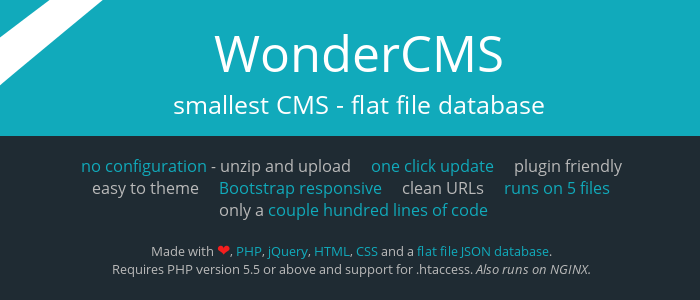
What Is WonderCMS?
WonderCMS stores content in files and gives authorized users a simple visual editing workflow. It is a practical fit for compact brochure sites and personal pages that do not need complex structured data or large editorial teams.
Who Is It For?
Build a small business profile, personal website, portfolio or compact information site. Projects needing advanced workflows, large catalogs or detailed user roles should compare a more structured CMS.
WonderCMS Features
Flat-file content storage
In-page editing
No MySQL requirement
Custom login URL
Themes and plugins
Responsive page options
Page creation and deletion
Password-protected administration
Choose a WonderCMS Hosting Plan
Choose a plan by comparing the supported PHP and database versions, storage, traffic, email and backup needs for your WonderCMS website. RSH Web Services can help with installation and hosting questions.
Pro Personal
For portfolios & blogsRenews at $7.99/mo
- 25 GB SSD Storage
- Free Domain Names
- Unmetered Bandwidth
- Secure Payment Options
- SiteJet AI Website Builder
- 360 Website Monitoring
- 45 Day Guarantee
- Encrypted Offsite Backups
- Malware Scan - Included
- WordPress - Included
- cPanel Softaculous - Included
- SSL Certificates - Included
- 5 Email Accounts
- 5 Parked Domains
- 5 Sub Domains
- 1 Website
Secure Checkout • Easy Setup
Pro Business
Growing teams & shopsRenews at $10.99/mo
- 50 GB SSD Storage
- Free Domain Names
- Unmetered Bandwidth
- Secure Payment Options
- SiteJet AI Website Builder
- 360 Website Monitoring
- 45 Day Guarantee
- Encrypted Offsite Backups
- Malware Scan - Included
- WordPress - Included
- cPanel Softaculous - Included
- SSL Certificates - Included
- 25 Email Accounts
- 25 Parked Domains
- 25 Sub Domains
- 5 Websites
Secure Checkout • Easy Setup
Pro Ultimate
For Unlimited ScaleRenews at $15.99/mo
- Unlimited SSD Storage
- Free Domain Names
- Unmetered Bandwidth
- Secure Payment Options
- SiteJet AI Website Builder
- 360 Website Monitoring
- 45 Day Guarantee
- Encrypted Offsite Backups
- Malware Scan - Included
- WordPress - Included
- cPanel Softaculous - Included
- SSL Certificates - Included
- Unlimited Email Accounts
- Unlimited Parked Domains
- Unlimited Sub Domains
- Unlimited Websites
Secure Checkout • Easy Setup
Website Uses for WonderCMS
Build a small business profile, personal website, portfolio or compact information site. Projects needing advanced workflows, large catalogs or detailed user roles should compare a more structured CMS.
Install WonderCMS in cPanel
RSH Web Services offers WonderCMS installation through Softaculous in cPanel. Select WonderCMS, confirm the release and hosting requirements, then choose the domain and installation directory. RSH Web Services can help with installation questions.
For a manual installation, follow the publisher's instructions for the exact release. Upload the application files, create and assign the database when required, complete the installer, and verify permissions and configuration before making the site public.
Migrating or Upgrading WonderCMS
Start with a complete cPanel file backup and review Softaculous options for the recorded WonderCMS installation. Move application files, content storage, themes, plugins and uploads together, then test login and editing. Follow release-specific update guidance; an installer update does not convert another CMS.
WonderCMS Hosting Requirements
Check the official requirements for WonderCMS 3.6.0, including supported PHP versions, extensions and writable file permissions. Because content is file-based, ensure the account can safely write application data and that backups capture all site files.
Security
Use a strong password and non-obvious login URL, keep WonderCMS and plugins updated and restrict writable files appropriately. Confirm the current application's security guidance rather than relying only on hidden login paths or HTTPS.
Backups and Recovery
Back up the entire WonderCMS directory, including its content data, themes, plugins, uploads and configuration. Store an independent copy and verify a restore in a separate folder before an upgrade.
WonderCMS Resources and Hosting Features
Plan Information
The existing resource links are retained for reference. Check older demos and documents against the installed application release before relying on their instructions.
Related Hosting Applications, Scripts, and Tools for All Hosting Accounts
Frequently Asked Questions
Does WonderCMS require MySQL?
No. WonderCMS is a flat-file CMS, so it stores site content in files instead of requiring a traditional MySQL database. That makes file backups especially important. Check plugins separately because an extension can introduce its own storage or service requirements beyond the core application.
Is WonderCMS still maintained?
Softaculous lists WonderCMS 3.6.0 with a January 2026 release date, indicating a recent cataloged package. Check the publisher's latest release and security information before installation, and review each theme or plugin independently. A maintained core does not guarantee that every third-party extension is current.
What kinds of websites suit WonderCMS?
WonderCMS fits small brochure sites, portfolios, personal pages and compact informational websites. Its lightweight flat-file model is less suited to large product catalogs, complex permissions or high-volume editorial workflows. Map the site's content and user needs before choosing it simply because installation is small.
Can I edit content directly on the page?
Yes. WonderCMS is designed around simple in-page editing for authorized users. Test text, images and page navigation in the installed release before handing access to an editor. Keep a backup before major changes and limit administrative credentials to people who need them.
Why should I change the login URL?
A custom login URL can reduce automated attempts aimed at a predictable administration path, but it is not complete security by itself. Use a strong unique password, keep the software updated and monitor access. Confirm the current WonderCMS security settings after every migration or restoration.
Can WonderCMS use themes and plugins?
Yes. WonderCMS supports themes and plugins for changing presentation or adding features. Verify that each extension supports version 3.6.0, has an acceptable license and receives maintenance. Test extensions on a copy first and remove unused ones to reduce compatibility and security risks.
How do I migrate a WonderCMS site?
Create a complete file backup through cPanel and inspect any Softaculous management options for the installation. Copy content files, plugins, themes, uploads and configuration together. Test the public pages and editing login on the destination before changing DNS, keeping the source as a recovery copy.
Which PHP version should I select?
Use the PHP range documented for the exact WonderCMS release and active plugins. Compare it with versions available in cPanel and test a staging copy before changing the live runtime. Do not infer compatibility from old tutorials or choose unsupported PHP merely to preserve an obsolete plugin.
What should a WonderCMS backup contain?
Save the entire installation directory, including flat-file content, configuration, themes, plugins and uploaded media. Keep another copy outside the live account and restore it to a test folder periodically. Verify that pages render and authorized editing works; opening the archive alone does not prove recoverability.
Share and Related WonderCMS Information
Tweet Share Pin Email
Providing the best professional grade hosting services to help your business grow
45 Day Money-Back Guarantee On all WonderCMS Hosting Packages