
Distributed Denial of Service Attacks
A distributed denial-of-service attack, commonly called a DDoS attack, overwhelms a website, server, application, or network with malicious traffic from many sources. By consuming bandwidth, connection capacity, processing power, or application resources, the attack prevents legitimate visitors from using the service normally. Effective DDoS protection relies on several coordinated safeguards, including traffic monitoring, filtering, rate limiting, firewalls, content delivery networks, scalable infrastructure, redundancy, and a tested incident response plan.


What Is a DDoS Attack?
A DDoS attack is an effort to make a web server, application, network, or website unavailable by overwhelming it with traffic from numerous sources. Potential targets range from banks, news organizations, and online stores to small businesses, individual websites, and public platforms. Any online service can be attacked, regardless of its size or the type of web hosting it uses.
When an attack succeeds, it can disrupt sales, customer support, communications, and other essential services. The affected organization may also incur mitigation and recovery expenses, lose revenue, fail to meet service commitments, and experience a lasting decline in customer confidence.
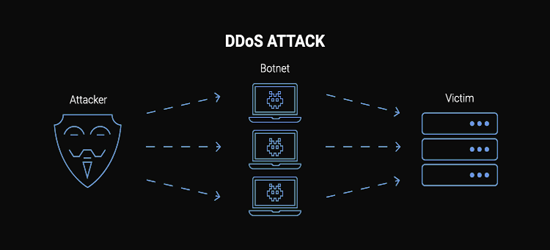
How Do DDoS Attacks Happen?
Attackers often control a network of infected devices called a botnet. Computers, servers, routers, cameras, and other connected devices can join a botnet after weak security or malicious software compromises them. The attacker then commands many of these devices to send data or requests toward one target simultaneously.
Botnets can generate large traffic floods that consume available bandwidth or drain server resources. Other DDoS methods rely on specially crafted requests that demand extensive processing, allowing even a lower volume of traffic to cause serious disruption.
Illegal DDoS-for-hire services have also lowered the technical barrier for launching attacks against businesses and online services.

The Impact of DDoS Attacks
When an online service is inundated with malicious traffic, legitimate requests may slow down, time out, or fail completely. The immediate effect is loss of availability, but the wider business impact can continue after service is restored.
- • Service Downtime: Customers, employees, and partners may be unable to reach the website or use important services.
- • Lost Revenue and Productivity: Interrupted transactions and unavailable systems can affect sales and daily operations.
- • Reputation Damage: Repeated or prolonged outages may reduce confidence in the organization’s reliability.
- • Recovery Costs: Investigation, mitigation, additional infrastructure, technical support, and post-incident improvements require time and money.
- • Contractual or Compliance Concerns: Extended outages may affect service-level agreements or industry obligations.
- • Security Distraction: A traffic flood may be used to divert attention while attackers attempt another form of intrusion.
How to Identify a DDoS Attack
The most common symptom of a DDoS attack is a website, server, or online service that suddenly becomes unusually slow or unavailable. However, a legitimate surge in visitors, a software problem, or a network failure can produce similar symptoms. Confirm the cause by reviewing traffic, resource use, error rates, and request patterns.
Traffic analytics tools, server logs, network monitoring, CDN reports, and firewall alerts can reveal warning signs such as:
- • A sudden increase in requests, bandwidth use, connections, or server load
- • Unusually high traffic from one IP address, IP range, region, network, or device profile
- • A surge in requests to one page, endpoint, protocol, or resource
- • Repeated requests that do not match normal visitor behavior
- • Traffic spikes at unusual times or in recurring intervals
- • Large numbers of incomplete connections, errors, or timeouts
None of these signs alone confirms a DDoS attack. A reliable baseline of normal traffic makes unusual behavior easier to spot and helps responders separate malicious activity from genuine visitor demand.

Types of DDoS Attacks
DDoS attacks are generally classified by the resource they are designed to exhaust. A campaign may target the application layer, network protocols, or available bandwidth. Multi-vector attacks combine two or more of these methods.
Application Layer Attacks
Application layer DDoS attacks target the part of a service that processes user requests. They may repeatedly request web pages, search functions, login forms, APIs, or database-driven resources. Because the requests can resemble legitimate activity, these cyber threats can be difficult to detect using traffic volume alone.
Effective defense requires application-aware monitoring, caching, bot detection, rate limits, and a web application firewall. These controls help distinguish normal requests from automated abuse involving HTTP, DNS, APIs, or resource-intensive database operations.
Protocol Attacks
Protocol attacks exploit or overwhelm the systems that manage network connections. They may consume connection tables, state-tracking capacity, firewall resources, or load-balancer capacity at the network layer. When those resources are exhausted, legitimate connections may be delayed or rejected even if bandwidth remains available.
Volumetric Attacks
Volumetric attacks attempt to consume the target’s available bandwidth with an enormous quantity of traffic. Some attacks send traffic directly, while reflection or amplification methods can produce responses much larger than the attacker’s original requests. An HTTP flood targets web resources, although HTTP floods are generally classified as application layer attacks rather than amplification attacks.
Rate Limiting for DDoS Protection
Rate limiting is a defensive measure rather than a type of DDoS attack. It controls how many requests a user, session, API key, or IP address may submit within a set period. Thoughtfully configured limits reduce automated abuse and stop a single source from consuming an excessive share of available resources.
Rate limiting can help reduce DDoS traffic, but it should be applied carefully. Limits that are too strict can block legitimate visitors, while distributed botnets can evade simple per-IP rules. Behavioral analysis, reputation signals, caching, challenges, and upstream filtering provide stronger layered protection.
Why DDoS Protection Is Crucial
DDoS protection preserves service availability by detecting suspicious traffic, filtering harmful requests, and keeping the service accessible to legitimate users. Organizations without adequate defenses can face serious operational and financial consequences.
- • Business Continuity: Mitigation helps websites and essential applications remain accessible during an attack.
- • Customer Trust: Reliable service protects the visitor experience and the organization’s reputation.
- • Controlled Recovery Costs: Prepared teams can respond faster and avoid improvised decisions during an incident.
- • Layered Security: Monitoring a DDoS event can help defenders identify related malicious activity rather than treating the outage in isolation.

How DDoS Attacks Evolve
Large-scale attacks demonstrate how quickly malicious traffic can grow. In February 2018, a 1.7 Tbps DDoS attack followed another terabit-scale event within days.
Attackers continue to change traffic sources, request patterns, duration, and target layers to bypass defenses. Some campaigns use short bursts that are difficult to investigate, while others alternate between network and application attacks. Defenders should therefore review traffic baselines, filtering rules, infrastructure capacity, and response procedures regularly.
Multi-Vector DDoS Disruption
A DDoS campaign may be combined with extortion, intrusion attempts, credential attacks, or other illegal activity. The resulting incident can require customer communication, provider coordination, investigation, breach assessment, and more complex recovery.
Layered attacks may also be multi-vector, combining high-volume traffic with protocol abuse and application requests. Organizations need defense at the network edge and application layer because one security control rarely addresses every attack method.
How to Prevent and Reduce DDoS Attacks
No organization can guarantee that attackers will never target it. DDoS prevention therefore focuses on reducing exposure, preparing sufficient capacity, detecting abnormal activity early, and starting mitigation quickly. A reliable hosting provider should clearly explain which DDoS protections are included, where filtering takes place, how incidents are escalated, and whether enhanced services are available.
The best preparation is planning before a DDoS attack. Document traffic baselines, important services, technical contacts, provider contacts, decision-making authority, customer communication procedures, and the conditions that trigger emergency measures.
- • Use a CDN or upstream mitigation service that can absorb and filter traffic before it reaches the origin server
- • Configure a web application firewall and appropriate rate limits
- • Keep the origin server address private when the architecture supports it
- • Monitor traffic, bandwidth, errors, latency, and resource consumption continuously
- • Maintain redundant systems and remove single points of failure
- • Patch operating systems, applications, plugins, firmware, and network devices
- • Use strong passwords and multi-factor authentication to protect administrative accounts
- • Restrict management access and never share credentials through insecure channels
- • Test the incident response plan and keep escalation contacts current

Educate Your Team
Educating your team about denial-of-service attacks supports a faster and more coordinated response. Staff members do not all need to be network engineers, but they should understand how to report service problems, who leads the response, and which communication channels remain available during an outage.
- • Attack Recognition: Teach responsible personnel how to recognize unusual traffic, repeated errors, timeouts, and unexplained service degradation.
- • Response Procedures: Define technical escalation, provider coordination, evidence preservation, decision-making, and customer communication responsibilities.
- • Regular Exercises: Test the response plan so team members can identify missing contacts, unclear responsibilities, and unavailable tools before a real incident.
Responding to a DDoS Attack
Even a well-protected service may experience disruption. A prepared DDoS response plan helps the team limit damage and restore normal service:
- Detect and Validate the Attack: Compare current traffic and resource use with normal baselines, while ruling out configuration failures or legitimate demand.
- Preserve Evidence: Record timestamps, logs, traffic characteristics, affected services, alerts, and mitigation actions.
- Activate Mitigation: Contact the hosting or DDoS protection provider, enable approved filtering rules, apply appropriate rate limits, and route traffic through upstream protection when available.
- Protect Essential Services: Prioritize critical endpoints and consider temporarily limiting nonessential, resource-intensive features.
- Communicate Clearly: Notify internal stakeholders and provide customers with accurate service updates without exposing sensitive defensive details.
- Review the Incident: Identify the attack vectors, determine which controls worked, and update capacity, configurations, contacts, and procedures.
AI-Assisted DDoS Detection and Mitigation
Artificial intelligence and machine-learning systems can assist with DDoS detection by comparing current traffic against established patterns. They may uncover anomalies, classify automated behavior, assign risk scores to requests, and help adjust mitigation rules faster than manual review alone.
AI-assisted protection is not a complete defense by itself. Its decisions depend on suitable training data, current traffic patterns, configuration, and human oversight. It works best as part of a layered strategy that also includes capacity planning, a CDN, a WAF, rate limits, bot controls, monitoring, and tested response procedures. Learn more about the strengths and limitations of AI-driven tools before relying on automated decisions.

Tools and Technologies for DDoS Protection
Modern DDoS defense brings together several complementary technologies. The most suitable combination depends on the application, its normal traffic patterns, the underlying infrastructure, the level of risk, and the organization’s recovery requirements.
Cloud-Based DDoS Protection
- • Examples: AWS WAF documentation, Microsoft Azure, and Google Cloud Armor.
- • Purpose: Cloud and edge services can inspect, filter, and absorb traffic before it reaches protected infrastructure.
Content Delivery Networks and Anycast Routing
- • Purpose: Distributed edge locations cache content and spread traffic across multiple points of presence, reducing pressure on the origin.
- • Limitation: The origin still needs suitable access controls, monitoring, and protection against traffic that bypasses the edge service.
Web Application Firewalls and Bot Management
- • Purpose: A WAF can inspect application requests, block known malicious patterns, issue challenges, and apply rules to sensitive endpoints.
- • Benefit: Application-aware controls can respond to attacks that do not depend on extremely high traffic volume.
AI-Powered Threat Detection
- • Examples: threat detection applications such as Darktrace, Aptori, and Fortinet FortiWeb.
- • Purpose: Automated analysis can help identify unusual traffic and support faster rule changes or alerts.
Network Intrusion Detection Systems
- • Examples: Snort, Aircrack-ng, and Suricata.
- • Purpose: These systems inspect network traffic for suspicious behavior, known signatures, and policy violations. They provide visibility but do not replace upstream DDoS mitigation capacity.
Best Practices for DDoS Prevention
Adopting preventive measures against DDoS attacks is as important as maintaining a response plan.
- • Establish a Traffic Baseline: Record normal request volume, bandwidth use, protocols, geographic patterns, and peak periods.
- • Perform Security Reviews: Identify exposed services, unnecessary ports, vulnerable endpoints, and single points of failure.
- • Update Software and Firmware: Apply security patches to servers, applications, plugins, firewalls, routers, and other network devices.
- • Restrict Administrative Access: Grant only the permissions people need and protect privileged access with multi-factor authentication.
- • Segment Networks: Isolate critical resources so disruption in one area does not automatically affect every service.
- • Protect the Origin: Where possible, accept web traffic only from approved proxies, CDNs, or mitigation networks.
- • Back Up Critical Data: Regular website backups support recovery from related failures or compromises, although backups do not stop DDoS traffic.
- • Test Mitigation Procedures: Confirm that monitoring, escalation, filtering, failover, and communication processes work as expected.

WordPress Plugins for Security
WordPress security plugins can improve login protection, detect malware, monitor file changes, block abusive requests, and enforce application-level firewall rules. They complement secure WordPress hosting, but a plugin on the origin server cannot absorb a large network flood once the connection or server capacity is exhausted. Protection against significant DDoS attacks must also operate upstream through the hosting network, CDN, WAF, or a specialist mitigation provider.
Defender Security
Defender Security provides malware scanning, firewall-related controls, login protection, file-change monitoring, security recommendations, and two-factor authentication features.
Anti-Malware Security and Brute-Force Firewall
This plugin scans WordPress installations for known malware and vulnerabilities and includes features intended to address malicious code and brute-force login attempts.
Stop User Enumeration
Stop User Enumeration is designed to make it harder for automated tools to discover WordPress usernames, reducing information that may be used in targeted login attempts.
Wordfence Security
Wordfence includes an application firewall, malware scanning, login security, live traffic information, and blocking controls for suspicious requests.
Security & Malware Scan by CleanTalk
CleanTalk’s security plugin includes malware scanning, firewall functions, security logs, and protection against suspicious login or request activity.
All-In-One Security – Security and Firewall
All-In-One Security provides login protection, firewall rules, account security checks, database protection features, and other WordPress hardening controls.
Security Ninja
Security Ninja provides security tests, vulnerability checks, malware-related features, firewall options, and recommendations for correcting WordPress configuration issues.
Rate Limit Guard
Rate Limit Guard applies request-limiting controls intended to reduce excessive automated traffic and brute-force activity. It may help with application-level abuse but should not be treated as complete protection from a large DDoS attack.
Anti Hacker Scan
Anti Hacker includes security checks, login protection, malware-related tools, firewall functions, and options intended to reduce exposure to common WordPress attacks.
Astra Security Suite – Firewall & Malware Scan
Astra Security Suite provides application firewall, malware scanning, login protection, security monitoring, and related WordPress security features.
Frequently Asked Questions
What is the difference between DoS and DDoS attacks?
A denial-of-service attack attempts to make a system unavailable, while a distributed denial-of-service attack sends malicious traffic from numerous devices or sources. Distribution makes traffic harder to block with one rule because it may arrive from many networks and resemble legitimate requests.
What are the most common signs of a DDoS attack?
Common warning signs include a sudden traffic surge, unusually slow pages, repeated timeouts, high bandwidth or resource use, large numbers of incomplete connections, and excessive requests to one endpoint. Similar symptoms can result from legitimate traffic or technical failures, so compare them with normal patterns and investigate server and network data.
Can a firewall stop a DDoS attack?
A firewall can block known sources, protocols, malformed traffic, or abusive request patterns, but it may be overwhelmed if malicious traffic saturates the connection before reaching it. Strong protection combines firewall rules with upstream filtering, scalable capacity, rate limiting, monitoring, and technologies such as ConfigServer Security and Firewall.
Does web hosting include DDoS protection?
Protection varies by hosting provider and plan. Ask what attacks are covered, whether mitigation is automatic, where traffic is filtered, whether there are capacity or usage limits, and how incidents are escalated. Review the provider’s broader website hosting security measures before choosing a service.
Can rate limiting prevent every DDoS attack?
No. Rate limiting can reduce excessive requests to pages, forms, login screens, and APIs, but a distributed attack may use many sources or consume bandwidth before application rules take effect. Use it as one part of a layered defense that also protects the network edge and origin server.
Can a WordPress security plugin stop a large DDoS attack?
A plugin may block abusive application requests, bots, or repeated login attempts, but it cannot process traffic after the server or network connection has been overwhelmed. Combine plugin-level protection with secure WordPress hosting, a CDN or WAF, upstream traffic filtering, and provider-level mitigation.
Do strong passwords protect a website from DDoS attacks?
Strong passwords improve account security, but they do not stop a traffic flood. They remain important because attackers may combine service disruption with attempts to access hosting, server, or administrator accounts.
Do website backups prevent DDoS attacks?
No. Website backups do not filter malicious traffic or keep a saturated connection available. They support recovery if an incident is accompanied by data loss, unauthorized changes, or system damage.
What should I do first during a suspected DDoS attack?
Confirm which services are affected, preserve logs and timestamps, contact your hosting or DDoS protection provider, and activate the approved response plan. Avoid making untested changes that could block legitimate users or destroy useful evidence.
Summary
DDoS attacks make websites, servers, networks, and online applications unavailable by exhausting bandwidth, connection capacity, or computing resources. Effective protection is layered and includes traffic baselines, continuous monitoring, upstream filtering, scalable infrastructure, a CDN, a WAF, appropriate rate limits, protected origin servers, redundancy, and a well-practiced incident response plan.
No single product can defend against every attack method. Regularly assess your website security measures, understand exactly what protection each provider supplies, and revise your procedures as traffic patterns and infrastructure evolve.
Author Bio: Dave Hatches
A seasoned writer with over a decade of experience in major organizations and agencies. His portfolio...
RSH Web Services includes DDoS protection with all our hosting plans.
Add Comment
This policy contains information about your privacy. By posting, you are declaring that you understand this policy:
- Your name, rating, website address, town, country, state and comment will be publicly displayed if entered.
- Aside from the data entered into these form fields, other stored data about your comment will include:
- Your IP address (not displayed)
- The time/date of your submission (displayed)
- Your email address will not be shared. It is collected for only two reasons:
- Administrative purposes, should a need to contact you arise.
- To inform you of new comments, should you subscribe to receive notifications.
- A cookie may be set on your computer. This is used to remember your inputs. It will expire by itself.
This policy is subject to change at any time and without notice.
These terms and conditions contain rules about posting comments. By submitting a comment, you agree with these rules:
- Although the administrator will attempt to moderate comments, not all comments can be moderated at all times.
- You acknowledge that all comments express the opinions of the original author and not those of the administrator.
- You will not post material which is knowingly false, obscene, hateful, threatening, harassing or invasive of privacy.
- The administrator has the right to edit, move or remove any comment for any reason and without notice.
Failure to comply with these rules may result in being banned from submitting further comments.
These terms and conditions are subject to change at any time and without notice.
Tweet Share Pin Email.
Crafted by our talented master copywriters
 The 16 Best WordPress Alternatives
 What are The Best Self-Hosted Polls & Analytic Program
 Best Self-Hosted Project Management Scripts
 e-Commerce Programs from Softaculous Compared
Offering cPanel, Free SSL (HTTPS) Certificate, Free Domain Name and Domain Private Registration
Comments (1)
Thanks for the detailed breakdown on DDoS protection strategies! I run a small e-commerce site and have been worried about potential attacks after hearing about recent incidents. Your article mentions AI-driven systems for real-time traffic analysis. Do you recommend any specific tools or services for a small business like mine to implement this? Also, how effective are plugins like Rate Limit Guard for WordPress in preventing these attacks? Appreciate the insights