
ProjectSend Hosting
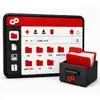
ProjectSend is a self-hosted client file-sharing application. Administrators upload files, assign them to specific clients or groups, and provide each client with a private page for authorized downloads. Current releases also support folders, categories, activity history, email notifications, search, optional comments, multilingual interfaces, and client uploads.
ProjectSend suits agencies, consultants, creative teams, professional services, and other organizations that need to deliver private files to named clients without using public share links. It is designed for controlled client distribution rather than simultaneous document editing or general cloud-drive synchronization.

ProjectSend Overview and Features
Who ProjectSend Is For
ProjectSend suits agencies, consultants, creative teams, professional services, and other organizations that need to deliver private files to named clients without using public share links. It is designed for controlled client distribution rather than simultaneous document editing or general cloud-drive synchronization.
Current ProjectSend is free software under the GNU General Public License version 2 or, at the user’s option, a later version. Commercial licensing is also available for organizations that cannot use the copyleft license. Review the exact package, edition, and any third-party components before modification or redistribution.
Maintenance and Compatibility Notice
ProjectSend is actively developed, but its current generation is a rebuild rather than a direct upgrade from ProjectSend Legacy. The official project instructs legacy users to install the new application separately and use its migration tool. Confirm which generation Softaculous installs before planning updates, extensions, or production migration.
Private client areas
Show each client only the files, folders, and information assigned to that account.
Client and group assignments
Distribute files efficiently to individual clients or defined groups.
Uploads and downloads
Allow administrators and, when enabled, clients to exchange approved files.
Notifications and languages
Notify recipients about new content using their configured language.
Search, folders, and categories
Organize files so clients and administrators can locate relevant material.
Activity history and comments
Review file activity and keep supported conversations beside shared files.
Choose a ProjectSend Hosting Plan
Compare expected users, file volume, storage growth, transfer traffic, database needs, previews, search indexing, scheduled work, and backup retention. Choose enough capacity for normal peaks and leave room for temporary archives, updates, and verified restores.
Our affordable web hosting plans offer simple, transparent pricing for businesses, blogs, online stores, and personal websites. Compare your options below and upgrade whenever you need additional storage, bandwidth, or performance.
Pro Personal
For portfolios & blogsRenews at $7.99/mo
- 25 GB SSD Storage
- Free Domain Names
- Unmetered Bandwidth
- Secure Payment Options
- SiteJet AI Website Builder
- 360 Website Monitoring
- 45 Day Guarantee
- Encrypted Offsite Backups
- Malware Scan - Included
- WordPress - Included
- cPanel Softaculous - Included
- SSL Certificates - Included
- 5 Email Accounts
- 5 Parked Domains
- 5 Sub Domains
- 1 Website
Secure Checkout • Easy Setup
Pro Business
Growing teams & shopsRenews at $10.99/mo
- 50 GB SSD Storage
- Free Domain Names
- Unmetered Bandwidth
- Secure Payment Options
- SiteJet AI Website Builder
- 360 Website Monitoring
- 45 Day Guarantee
- Encrypted Offsite Backups
- Malware Scan - Included
- WordPress - Included
- cPanel Softaculous - Included
- SSL Certificates - Included
- 25 Email Accounts
- 25 Parked Domains
- 25 Sub Domains
- 5 Websites
Secure Checkout • Easy Setup
Pro Ultimate
For Unlimited ScaleRenews at $15.99/mo
- Unlimited SSD Storage
- Free Domain Names
- Unmetered Bandwidth
- Secure Payment Options
- SiteJet AI Website Builder
- 360 Website Monitoring
- 45 Day Guarantee
- Encrypted Offsite Backups
- Malware Scan - Included
- WordPress - Included
- cPanel Softaculous - Included
- SSL Certificates - Included
- Unlimited Email Accounts
- Unlimited Parked Domains
- Unlimited Sub Domains
- Unlimited Websites
Secure Checkout • Easy Setup
Ways to Use ProjectSend
Agency file delivery
Send proofs, exports, reports, and finished assets to named clients.
Professional client portals
Provide controlled access to documents for consulting or service engagements.
Group distribution
Release the same approved files to selected customer or partner groups.
Private inbound uploads
Collect requested files from authenticated clients when uploads are enabled.
Installing ProjectSend
RSH Web Services offers ProjectSend installation through Softaculous in cPanel. Use the installer first to create the application files and any required database or administrator account. For manual installation, obtain the trusted current package, follow its official instructions, protect configuration and storage paths, and apply only documented permissions. RSH Web Services can help with installation.
Hosting Requirements
The current ProjectSend rebuild requires PHP 8.4 or newer and uses a database, uploads storage, environment configuration, a background worker, and cron. Its release ZIP is prepared for installation without Composer or npm on the server. ProjectSend Legacy has different requirements, so confirm the installed generation and follow its matching documentation.
Setup Checklist
Configure administrator credentials, roles, approved storage locations, upload limits, mail, scheduled tasks, transfer protocols, and backups that apply to this application. Test every workflow with a non-administrator account before allowing production access.
Migrating or Upgrading ProjectSend
Begin with cPanel backups of the application, configuration, database when used, and all managed files. For a Softaculous-managed installation, use only the backup, clone, restore, or upgrade controls displayed for ProjectSend before manual steps. Follow the documented version path and test permissions, uploads, downloads, searches, notifications, integrations, and scheduled tasks on a private copy. Softaculous upgrades ProjectSend only; it does not convert another file-management application into ProjectSend.
ProjectSend Security
Restrict access to trusted users, use unique credentials, prefer secure transfer protocols, apply least-privilege filesystem and application roles, and protect configuration and storage paths. Review logs, remove unused accounts, and install supported security updates after testing. Hosting protections add useful layers but cannot repair unsupported application code or prevent damage by an overprivileged account.
Backups and Recovery
Back up the application, configuration, database when used, user accounts, permissions, managed files, and any indexes or preview data needed for recovery. Keep multiple dated restore points and at least one copy outside the hosting account. Restore a private copy periodically and confirm that users, permissions, folders, files, versions, searches, transfers, and scheduled tasks work together.
All ProjectSend Plans Include







ProjectSend Resources
Existing software and hosting resources: Softaculous one-click installation feature, Firewall Security, DDoS Protection, Industry-Leading cPanel, Complete cPanel Features List.
Related Hosting Tools, Software, and Scripts for Every Hosting Account
Frequently Asked Questions
Who should receive access to ProjectSend?
Give access only to people who genuinely need the application and assign the narrowest permissions their work requires. Use individual accounts instead of shared credentials, remove access promptly when roles change, and review privileges on a schedule. Test each non-administrator role to confirm it cannot browse, download, edit, delete, or share content outside its approved scope.
How should authentication for ProjectSend be protected?
Use unique administrator credentials, long passwords, protected email accounts, and multifactor authentication when the installed edition or surrounding access layer supports it. Restrict the login page where practical, rate-limit repeated attempts, and monitor authentication logs. Never place default credentials in public documentation, and do not expose a legacy or unsupported release directly to the internet.
How do I plan storage for ProjectSend?
Estimate the current files, expected uploads, versions, previews, temporary archives, logs, and retained backups. Document systems can grow quickly when every revision is preserved, while remote file managers may work mainly with storage on another server. Monitor disk space and inode use, set sensible upload limits, and leave enough free capacity for updates and backup creation.
What should I test before updating ProjectSend?
Create matching file and configuration backups, then reproduce the application in a private staging location. Follow the official upgrade path for the exact source and target versions. Test login, permissions, uploads, downloads, editing, searches, notifications, scheduled tasks, integrations, and recovery. Confirm that you can roll back before applying the update to the production installation.
Can ProjectSend replace a full backup system?
No. File-management and document-management features help users organize or access content, but they do not replace independent, versioned backups. A deletion, compromised administrator account, failed upgrade, damaged database, or storage problem can affect application-managed data. Back up the application, configuration, database when used, and all managed files, then test restoration with a private copy.
How should uploads be secured in ProjectSend?
Allow only necessary file types and sizes, protect storage paths from script execution, and confirm who can view, replace, share, or delete each upload. Scan untrusted content where appropriate and keep executable website files separate from ordinary documents. File extensions and browser warnings alone are not sufficient controls, especially when public users can upload content.
How do I move ProjectSend to another server?
Inventory the application files, configuration, accounts, permissions, database if used, managed storage, scheduled tasks, and external connections. Copy related components from the same recovery point, update only documented paths and credentials, and test privately before changing DNS or user access. Compare record and file counts and keep the original installation available until the new copy is verified.
What logs should be reviewed for ProjectSend?
Review application, authentication, web-server, PHP, transfer, scheduled-task, and security logs that apply to the deployment. Look for failed logins, permission errors, unexpected downloads, repeated uploads, missing jobs, storage warnings, and application exceptions. Retain logs long enough to investigate incidents, protect them from alteration, and avoid recording passwords, session tokens, or unnecessary document contents.
How can I recover ProjectSend after a failed change?
Stop additional changes and preserve the current files, database, configuration, and logs. Restore a matched backup set to a private location and test authentication, roles, permissions, file access, uploads, searches, integrations, and scheduled tasks. Avoid combining a database from one date with managed files from another. Document the cause before attempting the change again.
Share This ProjectSend Hosting Page
Tweet Share Pin Email
Security is a primary concern when managing files, and Softaculous apps take this seriously. With built-in encryption, secure file sharing, and access control features, these apps protect your sensitive data both at rest and in transit. This ensures that your files remain secure and only accessible by authorized users, reducing the risk of data breaches and unauthorized access
Hosting Guarantee
45 Day Unconditional Money Back Guarantee On all ProjectSend Hosting Packages