
cPanel / Softaculous Tutorials & Guides
cPanel - Softaculous - Themes
Use the theme-management instructions in this guide to work with themes through the Softaculous-supported WordPress workflow. A theme changes presentation and may affect layout, menus, widgets, or site-editor options, so test the result before applying it to a live site.
Installing themes through Softaculous is a streamlined way to control the appearance and layout of your website without manual uploads or complex configuration. Softaculous provides a built in theme installer for supported applications, allowing site owners to preview, install, and manage themes directly from their hosting control panel. This guide explains the complete theme installation and management process so you can customize your site efficiently while maintaining stability and performance.
What the Theme Installer Does
The Softaculous theme installer allows you to browse available themes for supported scripts and apply them to an existing installation. Themes installed through Softaculous integrate directly with the application and do not require manual file handling. This reduces the risk of incorrect permissions or broken layouts while saving time during setup.
Why Use Softaculous for Theme Installation
No Manual Uploads
Eliminates manual uploads and file configuration
Compatible Themes
Ensures compatibility with the installed application
Faster Customization
Allows quick visual customization without downtime
Before You Begin
You need access to the WordPress installation and permission to manage themes. Confirm that the theme supports the site’s WordPress version and back up before replacing an active theme.
Step by Step Theme Installation
The installation workflow follows a simple and controlled sequence designed to prevent errors and maintain site integrity.
1. Open Softaculous in cPanel
Log into your cPanel
Click the Softaculous App Installer link in the Software section.
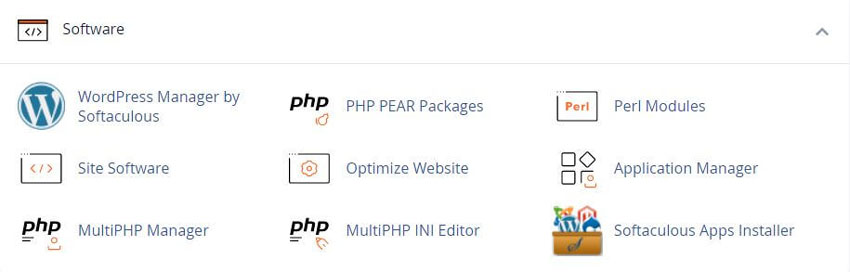
2. Select the Installed Application
Navigate to the list of installed applications and choose the one where the theme will be applied.
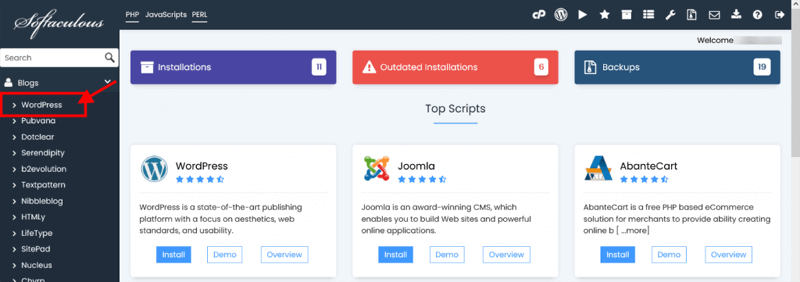
3. Browse and Choose a Theme
Locate the themes option within the application management area. Review available themes and select one that matches your design goals.
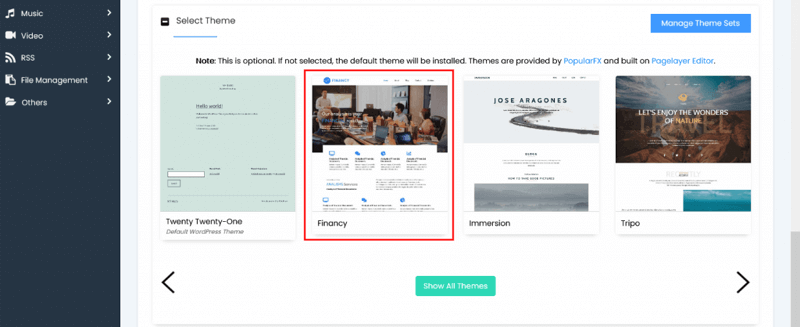
4. Install and Verify
Click the install option and allow Softaculous to complete the process.
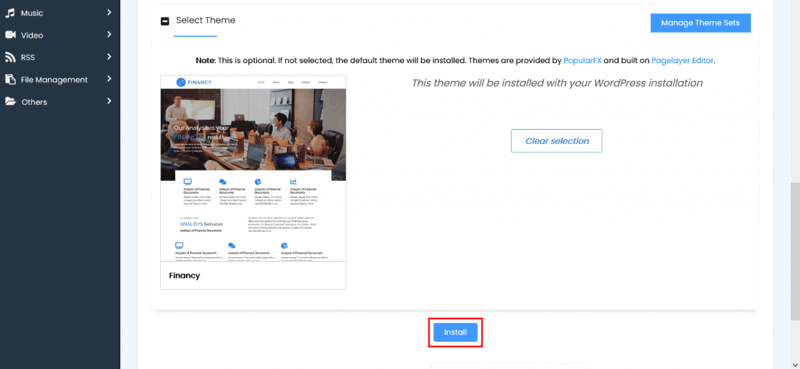
Once installed, confirm the theme appears correctly on the site.
Managing Themes After Installation
After installation, proper theme management helps maintain performance and security. Softaculous allows you to install multiple themes, but only one should remain active at a time. Unused themes should be removed to reduce clutter and potential vulnerabilities.
Preview First
Preview themes before applying them to avoid layout issues
Remove Unused Themes
Remove unused themes to reduce security risks
Test on Staging
Test theme changes on a staging site when possible
Check Compatibility
Confirm compatibility with plugins and extensions
Using Softaculous to install and manage themes provides a controlled and efficient way to customize your website. By following a structured workflow and applying best practices, you can maintain a visually appealing site while ensuring long term stability and ease of maintenance.
Frequently Asked Questions
Does WordPress Manager replace WordPress admin?
No. WordPress Manager exposes selected management actions from the hosting panel, while WordPress admin remains the application’s primary control area. See the WordPress Manager by Softaculous guide for panel-side tools. The available Softaculous controls vary by installation and server configuration. Use the manager for the actions it explicitly provides and use the WordPress tutorial index for settings or workflows it does not expose.
Why is my WordPress site not listed?
Softaculous must recognize the installation before WordPress Manager can manage it. Check the domain and directory, confirm that the files and database are present, and use the import WordPress workflow when appropriate. Confirm the record in the All Installations list. Do not register a second installation blindly, because duplicate records can make later updates or backups harder to identify.
Can every user manage WordPress installations?
No. Access depends on the cPanel account, server policy, and the permissions required by the particular operation. Inside WordPress, Administrator-level capabilities may be needed for users, plugins, themes, or settings. If an option is missing, check the account role and server configuration rather than assuming the feature is broken.
Should I back up before updating?
Yes, especially before a core, plugin, theme, or configuration change that can affect a live site. A backup gives you a recovery point, but it should be stored where you can access it and tested for restoration when practical. Use the Softaculous backup guide first, then test larger design changes with the staging guide when the installation supports it.
What if a plugin or theme update causes an error?
First review the task result and determine whether the update completed. If the site is unavailable, preserve the current state and use a verified recovery plan rather than repeating the update. Restore from a known copy with the restore a backup guide when needed. Check the developer’s compatibility notes, PHP and WordPress requirements, and error logs, then contact the hosting provider or developer if the cause remains unclear.
Are Manage Sets automatically safe?
No. A set applies a selected collection, but plugins and themes can conflict with one another, require licenses, or stop receiving maintenance. Test the set on a nonproduction installation, confirm each item’s source and license, and review the result after installation. Keep the set current as the underlying software changes. See Manage WordPress Sets before applying a bundle.
Why do theme options differ?
WordPress interfaces depend on the active theme and editor model. Block themes can expose Site Editor controls, while classic themes may use the Customizer, menus, and widgets. Softaculous or WordPress Manager cannot make theme-specific controls universal. Follow the theme developer’s current documentation for the interface shown on your site.
How can I confirm a manager action worked?
Return to the installation list or the relevant WordPress screen and check the reported version, setting, plugin, theme, or user. Then test the public site and administration area. Background jobs can be checked in the Softaculous task list. For changes that affect URLs, visibility, scheduled tasks, or debugging, verify those behaviors directly and record the previous setting before making another change.
Related Softaculous Tutorials and How To Guides
Wide range of key features for website management
Softaculous End-user Documentation
See our WHMCS cPanel Knowledgebase add-on module for Hosting Companies
Covering cPanel, WordPress, FTP and Softaculous
Related cPanel Tutorials and How To Guides
Tips and tricks that will make managing your website easier
Tweet Share Pin Email
Add Comment
This policy contains information about your privacy. By posting, you are declaring that you understand this policy:
- Your name, rating, website address, town, country, state and comment will be publicly displayed if entered.
- Aside from the data entered into these form fields, other stored data about your comment will include:
- Your IP address (not displayed)
- The time/date of your submission (displayed)
- Your email address will not be shared. It is collected for only two reasons:
- Administrative purposes, should a need to contact you arise.
- To inform you of new comments, should you subscribe to receive notifications.
- A cookie may be set on your computer. This is used to remember your inputs. It will expire by itself.
This policy is subject to change at any time and without notice.
These terms and conditions contain rules about posting comments. By submitting a comment, you agree with these rules:
- Although the administrator will attempt to moderate comments, not all comments can be moderated at all times.
- You acknowledge that all comments express the opinions of the original author and not those of the administrator.
- You will not post material which is knowingly false, obscene, hateful, threatening, harassing or invasive of privacy.
- The administrator has the right to edit, move or remove any comment for any reason and without notice.
Failure to comply with these rules may result in being banned from submitting further comments.
These terms and conditions are subject to change at any time and without notice.
 6 Best US Cities for Digital Nomad Entrepreneurs
 YouTube Tricks Tips and Hacks
 Optimizing a Drupal Website for Page Speed
 Ultimate Guide for The Best Joomla Resources
Comments