
cPanel / Softaculous Tutorials & Guides
cPanel - Softaculous - Remote Backup
This guide covers the remote-backup workflow in Softaculous: configuring an external destination, assigning it to an installation, and checking whether the backup can be written there. Remote storage is separate from the hosting account and requires valid connection details.
Backing up your website installations to a remote server adds a layer of security and ensures that your content and configurations are protected even if your primary hosting account encounters issues. Softaculous makes remote backups manageable by allowing you to create remote backup locations, assign them to installations, and edit or remove these locations as needed. Understanding how to handle remote backups helps site administrators protect data effectively while keeping storage organized.
What Is Remote Backup in Softaculous?
Remote backup means storing your site backups on an external server instead of just on the local hosting server. This can increase reliability because your backup files are stored in a separate environment, which is useful for disaster recovery or for larger storage options not available on your main server. A backup location can be set up using various protocols including FTP, FTPS, or SFTP.
Before You Begin
Prepare the remote host, path, port, credentials, and protocol details required by the destination. Test access and confirm that the remote account has enough space before depending on it for recovery.
How to Add a Remote Backup Location
Setting up a remote backup location in Softaculous involves filling in connection details for the server where backups will reside. You can do this through the Softaculous Enduser settings interface.
1. Open Softaculous in cPanel
Log into your cPanel
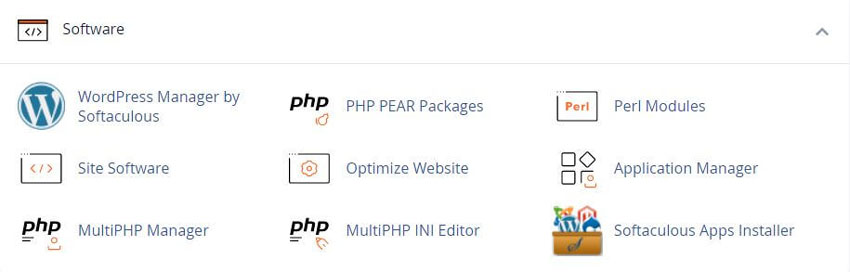
Click the Softaculous App Installer link in the Software section.
2. Add the Location
- Access Enduser Settings – Open the Softaculous Enduser panel and go to Edit Settings.
- Select Add Backup Location – Click this button to begin entering remote server details.
- Enter Connection Details – Include a friendly name, server host address, protocol choice, port number, and login credentials for access.
- Set Backup Path – Choose the directory on the remote server where backups will be stored.
- Save the Location – Confirm and save to register this new backup destination.
Managing Remote Backup Locations
Once a remote location is added, you can update or remove it as required. Editing allows you to adjust credentials or backup paths, while removal stops future backups from using that remote destination. If a backup location is deleted, affected installations fall back to the default backup location unless one is reassigned.
See our Add Backup Location guide for backing up on FTP, Dropbox, Google Drive, and Amazon S3.
Edit Existing Locations
Choose the edit option next to a saved location to modify its details.
Delete Unneeded Locations
Use the delete function to remove outdated destinations and keep your list clean.
Set Default Backup Location
Select one backup location as default so new or existing installations without a specific setting store backups there automatically.
Assign During Install
When installing a new script with Softaculous, choose a remote backup location in the advanced options to store that installation’s backups externally.
Benefits of Remote Backups
Storing backups remotely protects your data beyond the local server and allows flexibility in storage management. You can use servers with more space or integrate with cloud storage endpoints supported by your hosting setup. Remote backups support continuity, peace of mind, and organized data management without relying solely on your host’s default backup setup.
Frequently Asked Questions
Does a Softaculous backup include the whole website?
A Softaculous installation backup is intended to include the application files and associated database for that installation when the backup completes successfully. It is not automatically the same as a full cPanel account backup, mail backup, or server backup. See the Softaculous backup guide for what a local installation backup includes. Check the backup details and keep an independent recovery copy when the website is business-critical.
Where should I store backups?
Keep at least one copy separate from the hosting account when practical. A remote location can help if the hosting account or server becomes unavailable, but it must be configured and tested. Use this page plus the Add Backup Location steps for FTP, Dropbox, Google Drive, or Amazon S3. Confirm the destination, credentials, available space, and retention policy rather than assuming that a backup task proves the copy can be restored.
Why is the backup option missing?
The hosting administrator may disable backups or restore functions for end users. The installation may also be unsupported or not recognized by Softaculous. Check the All Installations list and server policy first. Related preference controls are in Edit Settings. If the feature remains unavailable, contact the hosting provider or use a separately verified backup method that matches the application.
How do I know a backup worked?
Look for the completed backup entry or success message in Softaculous and confirm its date, size, target installation, and storage location. A successful creation message is useful but does not replace a restore test. Background jobs can be checked in the Softaculous task list. For important sites, periodically verify that the archive can be accessed and that the recovery process is understood.
Can I restore over a live site?
Yes, where the restore control is available, but restoration can replace current application files and database content. Confirm the target and backup date first, preserve a current copy if possible, and plan a maintenance window. Follow the restore a backup guide. Afterward, test the public site, login, forms, media, links, and any connected services.
How many backups should I keep?
The right retention count depends on how often the site changes, how quickly problems are discovered, available storage, and recovery requirements. Automated rotation removes older copies when the configured limit is reached. See automated backups for frequency and rotation settings. Choose a count the account can hold, and keep an additional remote or independent copy if losing the hosting account would be unacceptable.
Are backups a substitute for updates?
No. Backups provide a recovery point; they do not correct vulnerable or outdated software. Keep the application, plugins, themes, and server components maintained according to their official documentation, and create a backup before consequential updates. Test updates on staging when the application and Softaculous workflow support it.
What should I do if a restore fails?
Do not repeatedly overwrite the live installation without identifying the failure. Check the task status, available disk space, backup integrity, destination permissions, and application requirements. Preserve the current files and database if possible, then contact the hosting provider or application support with the exact error and backup details. Use Contact Us if you need account-level help.
Related Softaculous Tutorials and How To Guides
Wide range of key features for website management
Softaculous End-user Documentation
See our WHMCS cPanel Knowledgebase add-on module for Hosting Companies
Covering cPanel, WordPress, FTP and Softaculous
Related cPanel Tutorials and How To Guides
Simple to use hosting dashboard fix website issues yourself
Tweet Share Pin Email
Add Comment
This policy contains information about your privacy. By posting, you are declaring that you understand this policy:
- Your name, rating, website address, town, country, state and comment will be publicly displayed if entered.
- Aside from the data entered into these form fields, other stored data about your comment will include:
- Your IP address (not displayed)
- The time/date of your submission (displayed)
- Your email address will not be shared. It is collected for only two reasons:
- Administrative purposes, should a need to contact you arise.
- To inform you of new comments, should you subscribe to receive notifications.
- A cookie may be set on your computer. This is used to remember your inputs. It will expire by itself.
This policy is subject to change at any time and without notice.
These terms and conditions contain rules about posting comments. By submitting a comment, you agree with these rules:
- Although the administrator will attempt to moderate comments, not all comments can be moderated at all times.
- You acknowledge that all comments express the opinions of the original author and not those of the administrator.
- You will not post material which is knowingly false, obscene, hateful, threatening, harassing or invasive of privacy.
- The administrator has the right to edit, move or remove any comment for any reason and without notice.
Failure to comply with these rules may result in being banned from submitting further comments.
These terms and conditions are subject to change at any time and without notice.
 What is the Difference Between Shopify and WordPress
 Designing Tips for Building a User-Friendly Website
 How to Improve Your Website Design
 SEO For Beginners, Introduction to SEO Basics
Comments