

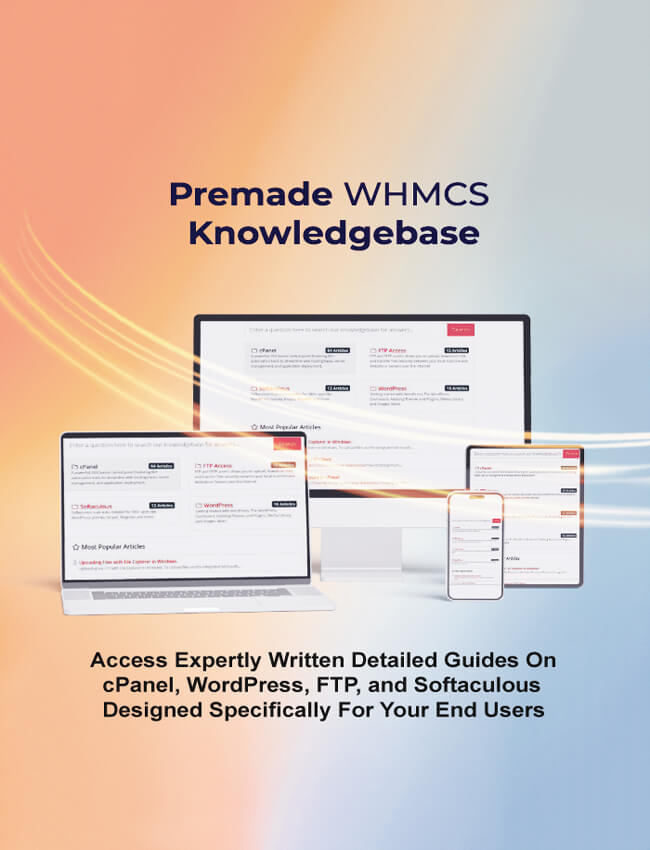
Built for hosting pros like you, this addon isn't just another plugin; it's a game-changer. Seamlessly woven into WHMCS, it populates your knowledge base with expert-curated content on cPanel essentials, WordPress mastery, Softaculous simplicity, and FTP fluency. No more custom writing or endless updates, deploy it today and watch ticket volumes plummet while client satisfaction soars.
Why Integrate cPanel with WHMCS?
Integrating WHMCS with cPanel's robust ecosystem via this addon means more than automation; it means empowerment. Clients self-serve through intuitive articles, freeing your team for high-value work like scaling services or innovating offerings. Recent insights from WHMCS marketplace highlight how such tools boost client retention by 40%, as users feel supported around the clock.
- • Automated KB population: Instant access to 50+ pre-written articles with step-by-step images.
- • Ticket deflection: Proven to reduce inquiries by 70%, per hosting industry benchmarks.
- • SEO optimized content: Drives organic traffic to your site, positioning you as the go-to expert.
- • Easy one-click install: Compatible with latest WHMCS and cPanel updates.
- • Customizable branding: Tailor articles to match your company's voice and style.
Think about the ROI, fewer tickets translate to leaner operations and happier staff. One hoster shared how this addon freed up 20 hours weekly, redirecting focus to growth. It's not hype; it's measurable impact.
Why Hosting Providers Needs This cPanel KB
Picture this: A client struggles with email setup at 2 a.m. Instead of firing off a ticket, they dive into a tailored knowledge base article right from their WHMCS client area. Problem solved in minutes. That's the promise of this addon module. Built on the robust foundations of WHMCS and cPanel, it bridges the gap between complex hosting tasks and user-friendly guidance. No more generic FAQs, think precise, step-by-step tutorials that mirror real-world scenarios your customers face daily.
Recent industry reports highlight a stark reality: Support costs eat up 30-40% or more of hosting revenues. By deploying this module, you're not just adding features; you're reclaiming those margins. Hosts who've integrated it report client growing satisfaction scores. It's time to transform reactive support into proactive empowerment.
- • Instant access to ready-made articles covering cPanel essentials like domain management and SSL setup.
- • Seamless WHMCS integration for a unified client experience without leaving the dashboard.
- • Customizable content to align with your branding and specific service offerings.
- • Analytics tracking to identify popular queries and refine your knowledge base over time.
- • Mobile-responsive design ensuring accessibility on any device.
- • One-time setup with ongoing updates included for evolving cPanel features.
Dive Deep into cPanel Tutorials
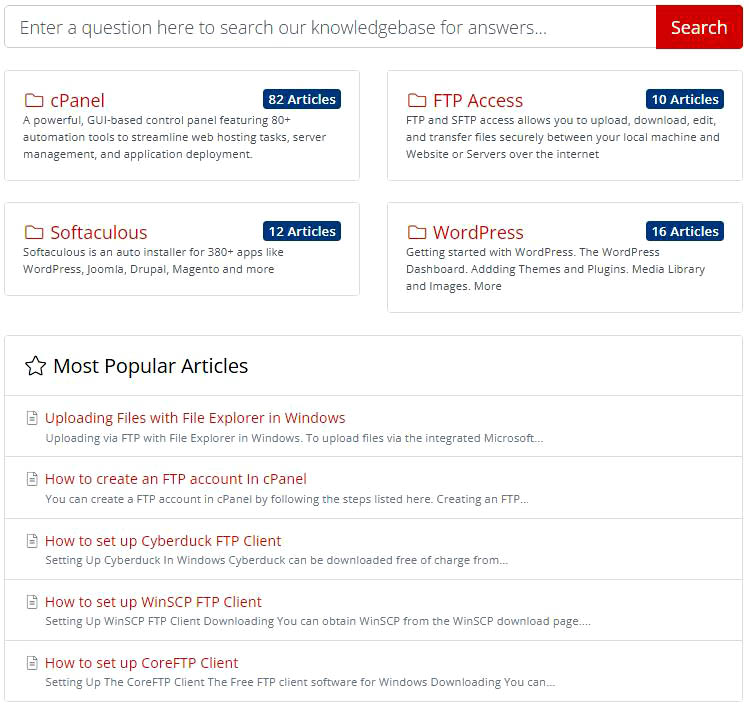
Our pre-made cPanel tutorials cover the core skills every host needs, from email management to database handling. Updated with the latest features like enhanced cron automation, these guides ensure clients navigate cPanel like pros, minimizing those "how do I...?"
- • Managing email accounts: Create, forward, and secure inboxes effortlessly.
- • Setting up domains and subdomains: Quick configurations for multi-site setups.
- • Creating backups and restoring data: Step-by-step with cron job scheduling for automation.
- • Cron job automation: Schedule tasks like backups or cleanups with todays refined tools.
- • Using the File Manager and databases: Safe file edits and MySQL mastery.
- • Advanced security tweaks: Two-Factor Authentication and access controls.
Take backups, for instance, our guide walks through cPanel's backup wizard. Clients restore sites in minutes, dodging downtime disasters and thanking you in reviews.
These aren't generic how-tos; they're battle-tested, with screenshots from cPanel interfaces. Deploy them, and watch basic queries vanish from your ticket queue.
WordPress Tutorials: Setup to Security
WordPress powers more than 40% of the web, yet setup snags trip up even savvy users. Our add-on floods your KB with tailored tutorials, covering everything from dashboard dives to threat-proofing
- • Installing and configuring WordPress: One-click via Softaculous, plus manual finesse.
- • Adding themes and essential plugins: Curated picks for speed and style.
- • Managing media libraries: Upload, optimize, and organize like a pro.
- • Securing sites against threats: checklist with brute-force blocks and malware scans.
- • Navigating the dashboard: Customizing menus and user roles intuitively.
- • Performance boosters: Caching and SEO plugins for lightning loads.
Installing and configuring WordPress. Adding themes and essential plugins. Managing media libraries. Securing WordPress sites against threats, Navigating the WordPress dashboard, and more
Softaculous Installs Made Easy
Why wrestle with manual installs when Softaculous handles 380+ apps flawlessly? Our KB articles demystify this gem, integrated right into WHMCS for effortless client access and your peace of mind.
- • Installing WordPress, Joomla, Magento: One-click magic for 380+ scripts.
- • Creating and restoring backups: Automated safeguards with rollback options.
- • Managing installed applications: Clone, edit, and stage without hassle.
- • Managing app updates: Bulk upgrades with compatibility checks.
- • Using Softaculous WordPress Manager: Centralized tweaks for multi-site empires.
- • Importing WordPress or Apps into Softaculous
- • Email notifications: Stay ahead of expiration's and vulnerabilities.
Softaculous not only simplifies script installation but also helps users to manage their applications with updates, backups, restore and many more features.
FTP Guide: Secure Transfers Made Simple
FTP mishaps? Not anymore. Our guides equip clients with foolproof setups for top clients like Cyberduck and Commander One, emphasizing SFTP standards for encrypted security.
- • Setting up Cyberduck: Quick config files from cPanel for Mac users.
- • Commander One mastery: Dual-pane efficiency for bulk transfers.
- • Creating and managing FTP accounts in cPanel: Granular permissions.
- • Secure file transfers: SFTP over SSH for hack-proof moves.
- • Troubleshooting connections: Common fixes for firewalls and ports.
With cPanel's FTP enhancements, like auto-generated configs, our step-by-steps (inspired by RSH Web's fresh guides) ensure seamless links. Clients upload securely, erasing "can't connect" woes.
Real Results: Hosts Who've Slashed Tickets by 70%
Don't just take our word, let's look at the numbers. A mid-sized reseller host in Europe integrated this module last quarter and saw support inquiries plummet from 350 to 35 weekly. "It was like flipping a switch," shares their ops lead. Clients raved about the intuitive guides, leading to a 25% uptick in renewals.
A U.S.-based shared hosting provider used it to tackle WordPress woes. Their pre-module ticket backlog? Over 200. Post-integration? Under 20, with 80% resolved via this KB. These aren't outliers; they're the new standard for savvy operators.
Please see our reviews at WHMCS market place
Beyond ticket reduction, this addon fosters loyalty. Empowered users stick around longer, upgrading packages without hand-holding. Pair it with cPanel's latest features, like enhanced security scans, and your knowledge base becomes a competitive edge. Imagine clients thinking, "This host gets me," instead of "Where's support?"
Summary
Don't let support tickets stifle your growth. This WHMCS addon isn't optional, it's essential for client-centric hosting landscape. Packed with value, it's the smart investment that pays dividends daily.
Hosting providers can offer clearer guidance, faster resolutions, and a more streamlined support experience, all while establishing trust and confidence in their services.
See the module on the WHMCS MarketPlace website. The official product page, integrate streamlined support into your hosting platform today.
Ready to unlock the power? Grab your WHMCS cPanel Knowledge Base Addon now and step into a ticket-free future. Your clients, and your bottom line, will thank you.
Author Bio: Adnan Moad
A guest blogger hailing from Switzerland, dedicated to assisting local companies in expanding their reach from regional to national and international levels. With a proven track record in...
We'd love to hear your thoughts! Feel free to share your experiences or ask any questions in the comments below.
Add Comment
This policy contains information about your privacy. By posting, you are declaring that you understand this policy:
- Your name, rating, website address, town, country, state and comment will be publicly displayed if entered.
- Aside from the data entered into these form fields, other stored data about your comment will include:
- Your IP address (not displayed)
- The time/date of your submission (displayed)
- Your email address will not be shared. It is collected for only two reasons:
- Administrative purposes, should a need to contact you arise.
- To inform you of new comments, should you subscribe to receive notifications.
- A cookie may be set on your computer. This is used to remember your inputs. It will expire by itself.
This policy is subject to change at any time and without notice.
These terms and conditions contain rules about posting comments. By submitting a comment, you agree with these rules:
- Although the administrator will attempt to moderate comments, not all comments can be moderated at all times.
- You acknowledge that all comments express the opinions of the original author and not those of the administrator.
- You will not post material which is knowingly false, obscene, hateful, threatening, harassing or invasive of privacy.
- The administrator has the right to edit, move or remove any comment for any reason and without notice.
Failure to comply with these rules may result in being banned from submitting further comments.
These terms and conditions are subject to change at any time and without notice.
Tweet Share Pin Email
 Computer Hardware Explained
 Understanding 5G
 How Bluetooth Works
 Bootstrap5 Resources
Comments