
cPanel - Domains - Zone Editor
This interface allows you to modify your domain’s DNS records. These are files that contain the information about your domain, including which IP addresses it points to.
DNS converts human-readable domain names to computer-readable IP Addresses.
https://rshweb.com could convert to 192.0.0.1
DNS relies on zone records that exist on your server to map domain names to IP addresses.
With the Zone Editor interface you can create, edit, and delete DNS Domain Name System Zones record
For each listed domain you can perform the following actions:
A Record - Create a new A record. When you select this record type, a new window will appear. Enter a valid DNS zone name in the Name text box and a valid IPv4 address in the Address text box.
CNAME Record - Create a new CNAME record. When you select this record type, a new window will appear. Enter a valid DNS zone name in the Name text box and a FQDN in the CNAME text box.
MX Record - Create a new MX record. When you select this record type, a new window will appear. Enter the record’s priority value in the Priority text box and a FQDN in the Destination text box.
DNSSEC - If Available Manage the domain’s Domain Name System Security Extensions DNSSEC records. When you select this record type, the system directs you to the DNSSEC interface.
Manage - Add or edit additional domain records. When you click Manage, the system directs you to the Manage Zone interface.
Editing the DNS zone records in cPanel
A Record, CNAME, MX Record, TXT Record
Log in to your cPanel
Navigate to the "Domains" section and click on Zone Editor option
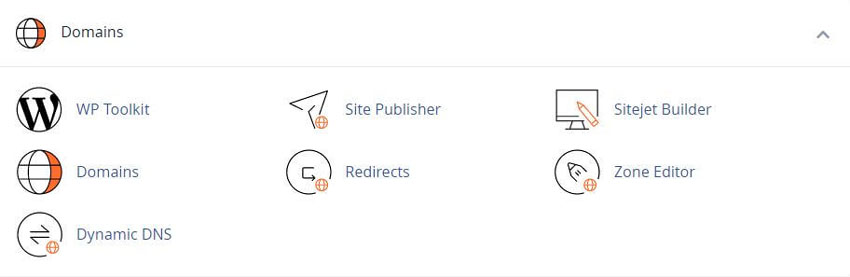
If more than one Domains hosted, they will also list them here. Make sure you edit the correct line

A-record
If you would like to add a new record, click |+A Record|
(An A record (Address Record) points a domain or subdomain to an IP address)
"Name" must be a domain with an optional period at the end
"Address" must be an IP-address
Once all the fields are filled click on "Add Record" button
CNAME record
If you would like to add a cname record, click |+CNAME Record|
(A CNAME (Canonical Name) points one domain or subdomain to another domain name, allowing you to update one A-Record each time you make a change, regardless of how many Host Records need to resolve to that IP address)
"Name" must be a domain with an optional period at the end
"CNAME" must be a valid zone name
Once all the fields are filled click on "Add Record" button
MX record
Mail Exchanger
If you would like to add a MX record, click |+MX Record|
This record identifies the servers that handle a domain’s email.
Changes that you make to this record control where the server delivers a domain’s email.
You can set the following values:
Priority - Identifies the servers that handle a domain’s email. This value for each MX record determines the order in which other mail servers will use the domain’s mail server. A lower value indicates a higher priority level. A value of 0 indicates the highest priority level.
Typical numbers would be 14400
Destination - The mail server. This must be a fully-qualified domain name (FQDN). Example could be mail.rshweb.com>
TXT record
TXT records now can be added through the |+Manage| link, then with the |+Add Record| drop down box
This record contains text data for various services to read. For example, TXT records can specify data for SPF, DKIM, or DMARC email authentication
Name - must be a domain with an optional period at the end
TTL - must be a positive integer (in seconds)
TXT Data - cannot be empty or more than 255 characters
These records hold free form text of any type. A fully qualified domain may have many TXT records. The most common uses for TXT records are Sender Policy Framework (SPF), DomainKeys (DK), DomainKeys IdentifiedE-mail (DKIM). TXT records historically have also been used to contain human readable information about a server, network, data center and other accounting information
Example - example.com TXT "v=spf1 +a +mx +ip4:198.187.31.8 ?all"
Once all the fields are filled click on "Add Record" button
To edit existing record, please perform following steps:
Log in to your cPanel
Navigate to the "Domains" section and click on "Zone Editor" option:
Click on the |+Manage| link
Here you can modify or add records with the |+Add Record| drop down box
cPanel Help Guides and Step-by-Step Tutorials
Regular updates, maintenance improvements and security measures
Tweet Share Pin Email
Add Comment
This policy contains information about your privacy. By posting, you are declaring that you understand this policy:
- Your name, rating, website address, town, country, state and comment will be publicly displayed if entered.
- Aside from the data entered into these form fields, other stored data about your comment will include:
- Your IP address (not displayed)
- The time/date of your submission (displayed)
- Your email address will not be shared. It is collected for only two reasons:
- Administrative purposes, should a need to contact you arise.
- To inform you of new comments, should you subscribe to receive notifications.
- A cookie may be set on your computer. This is used to remember your inputs. It will expire by itself.
This policy is subject to change at any time and without notice.
These terms and conditions contain rules about posting comments. By submitting a comment, you agree with these rules:
- Although the administrator will attempt to moderate comments, not all comments can be moderated at all times.
- You acknowledge that all comments express the opinions of the original author and not those of the administrator.
- You will not post material which is knowingly false, obscene, hateful, threatening, harassing or invasive of privacy.
- The administrator has the right to edit, move or remove any comment for any reason and without notice.
Failure to comply with these rules may result in being banned from submitting further comments.
These terms and conditions are subject to change at any time and without notice.
 How Encryption Works
 Firewalls Explained
 How VPNs Work
 What Is JavaScript
Comments