
cPanel - Email - Default Address
Creating a Catch-All email address in cPanel
The default email address will "catch" any email that is sent to your domain name
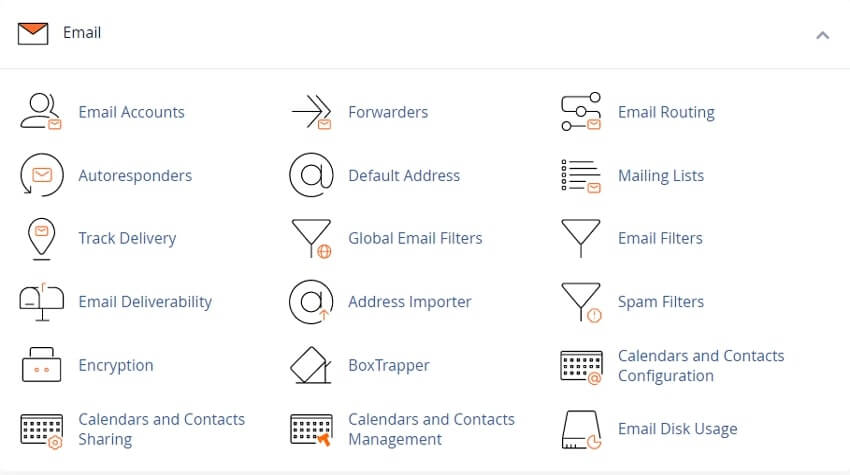
To set up or update a default address for your domain, perform the following steps:
1) From the cPanel Home page, select Default Address under Email.
2) From the Send all unrouted email for the following domain menu, select the domain for which you wish to set or update a default address.
Select one of the following settings
Discard the email while your server processes it by SMTP time with an error message
Select this setting to send an error message to the sender.
Then, enter an error message in the Failure Message (seen by sender) text box.
Forward to Email Address - Select this setting to forward mail to another address. Then, enter the email address or your cPanel account’s username in the Forward to Email Address text box.
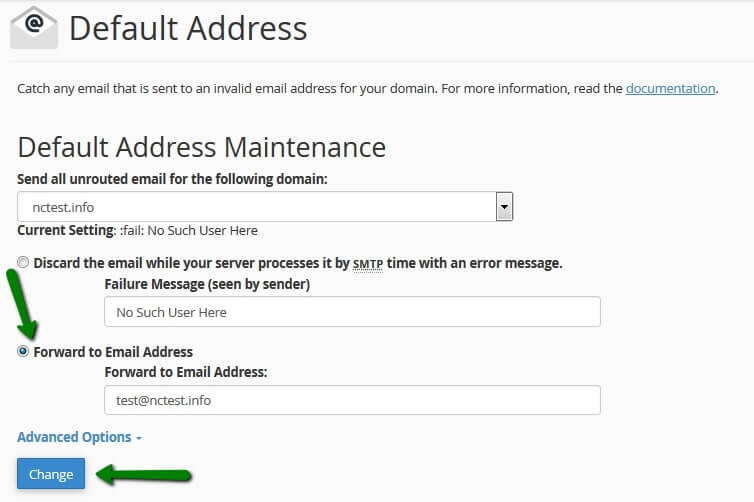
Click Advanced Options to view the following additional settings:
- • Forward to your system account - Select this setting to forward mail to the system account.
- • Pipe to a Program - Select this setting to forward messages to a program at the path that you define in the available text box.
Related cPanel Tutorials and How To Guides
A beginners guide to cPanel Step by step tutorials
Tweet Share Pin Email
Add Comment
This policy contains information about your privacy. By posting, you are declaring that you understand this policy:
- Your name, rating, website address, town, country, state and comment will be publicly displayed if entered.
- Aside from the data entered into these form fields, other stored data about your comment will include:
- Your IP address (not displayed)
- The time/date of your submission (displayed)
- Your email address will not be shared. It is collected for only two reasons:
- Administrative purposes, should a need to contact you arise.
- To inform you of new comments, should you subscribe to receive notifications.
- A cookie may be set on your computer. This is used to remember your inputs. It will expire by itself.
This policy is subject to change at any time and without notice.
These terms and conditions contain rules about posting comments. By submitting a comment, you agree with these rules:
- Although the administrator will attempt to moderate comments, not all comments can be moderated at all times.
- You acknowledge that all comments express the opinions of the original author and not those of the administrator.
- You will not post material which is knowingly false, obscene, hateful, threatening, harassing or invasive of privacy.
- The administrator has the right to edit, move or remove any comment for any reason and without notice.
Failure to comply with these rules may result in being banned from submitting further comments.
These terms and conditions are subject to change at any time and without notice.
 Why Do I Need A Secure HTTPS Website
 The Best WordPress Learning Resources
 Common Business Blogging Mistakes To Avoid
 My Domain Name is taken - What can I do
Comments